product description
The temperature and humidity measuring instrument is an instrument for measuring temperature and humidity. It is a low-power digital instrument that integrates signal acquisition, display, storage, and analysis. Widely used in medical and pharmaceutical, food processing, agricultural research, biochemical laboratories, meteorological detection, electronic manufacturing, HVAC, file management, archaeological research, fiber textiles, cold chain transportation and other fields, providing complete environmental real-time monitoring for the majority of users , Alarm and data logging solutions.
2.1 Product Features
★ Using high-precision, high-sensitivity temperature and humidity acquisition sensors, high precision, fast response.
★ Low power consumption design, 9V dry battery can work continuously for more than 15 days, and the battery is easy to replace.
★ With a large amount of data storage capacity, it can store up to 16,000 sets of temperature and humidity data. multiple data
Protection mechanism to ensure that data will not be lost.
★ Comes with PC analysis software, which is convenient for customers to perform various operations on the instrument, and is easy to use.
2.2 Fields of use
Biaozhi GM1360A temperature and humidity measuring instrument is widely used in medical pharmaceuticals, food processing, agricultural research, biochemical laboratories, meteorological detection, electronic manufacturing, HVAC, file management, archaeological research, fiber textiles, cold chain transportation and other fields.
2.3 Basic functions
(1)Large screen dual display
(2)Temperature and Humidity Measurement
(3)Temperature and humidity maximum and minimum measurement
(4)Dew point temperature measurement
(5)data retention
(6)℃/℉ unit conversion
(7)USB interface setting and data download
(8)Low battery reminder
(9)Automatic shut-down
(10) Temperature and humidity Recorder (set by computer software)
2.4 Technical parameters
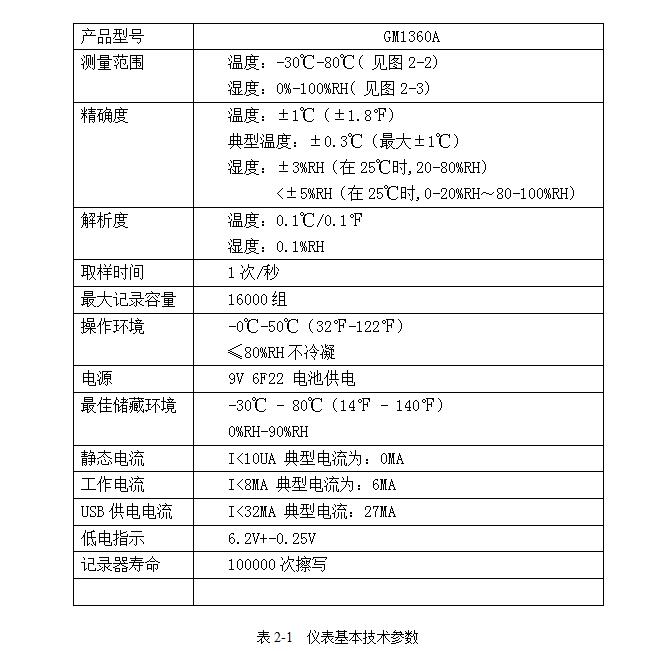
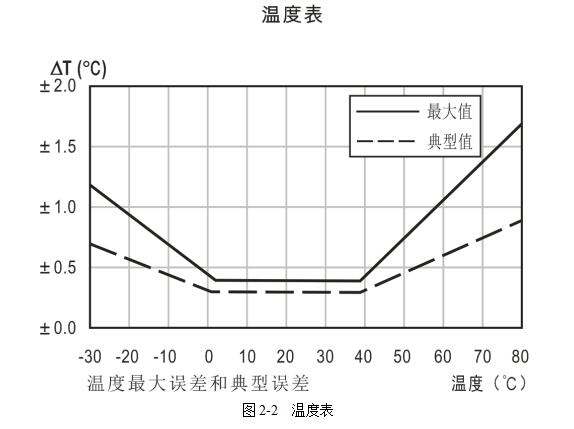
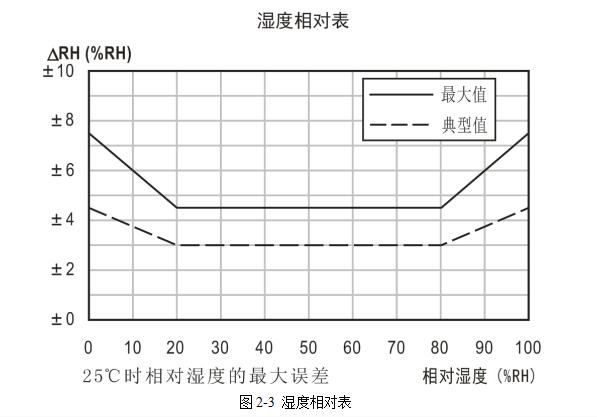
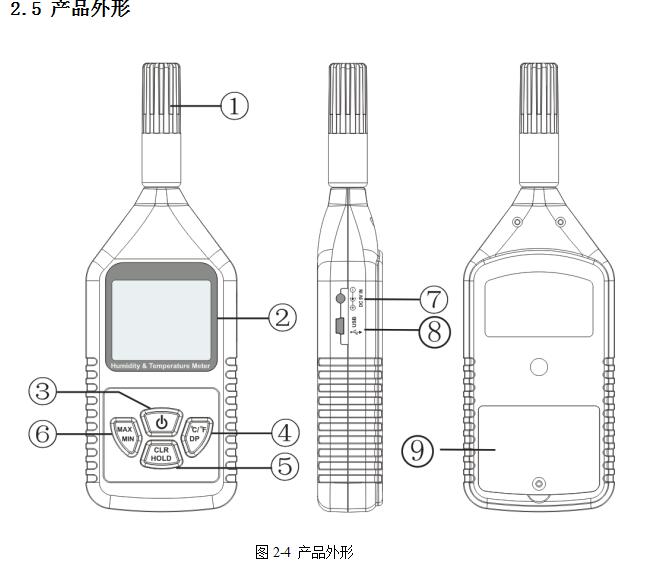
1>.Temperature and humidity sensor.
2>.LCD display
3>.Power switch
4>.Temperature unit conversion key
5>. Reading hold key
6>.Temperature and humidity maximum/minimum measurement key
7>. Power adapter jack
8>.USB jack
9>.Battery door
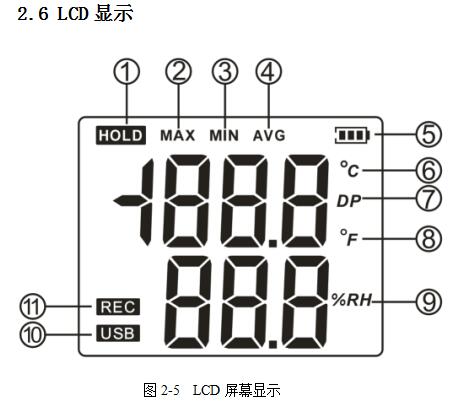
1>. Lock symbol
2>. Maximum value symbol
3>. Minimum value symbol
4>. Average symbol
5>.Battery level symbol
6>.Celsius symbol
7>. Dew point temperature symbol
8>. Fahrenheit symbol
9>.Humidity unit symbol
10>.USB connection prompt symbol
11>. Record symbol
2.7 Key Operation Instructions
1. Short press the switch key to switch the machine
2. Short press the MAX/MIN key to switch to the maximum value, and the minimum value is displayed
3. Short press the ℃/℉/DP key to switch between Celsius and Fahrenheit
4、短按CLR/HOLD键保持当前温湿度,再次短按解除保持
5、长按℃/℉/DP键,切换显示露点温度5s
6、长按MAX/MIN键,取消自动关机
2.8 电脑连接模式
1、电脑设置时间间隔后,可选择GM1360A两种数据处理模式在线测量数据模式:即本机一直连接电脑,According to设置的时间间隔实时的将数据传输到电脑离线存储数据模式:即本机将According to设置的时间间隔,存储温湿度值到其内部EEPROM,等待下 次连接电脑时读出
2、断开电脑连接,恢复正常显示,若设置了离线存储,显示“REC”符号
TH-Logger软件使用说明
3.1 控制计算机配置要求
☆ 要求安装Microsoft Windows操作系统,Data-Logger不支持Linux/Unix等其他操作系统。
☆ 中央处理器主频不低于1.6GH,内存不少于256MB。
☆ 至少要有一个USB接口。
3.2 安装TH-Logger软件
☆ 将软件光盘放入光驱,并运行Setup1.msi安装程序即可。若软件无法安装,请下载安装Microsoft.NetFramework 3.5后重试。
☆按照安装向导对话框提示完成安装操作即可。
3.3 TH-Logger软件操作说明
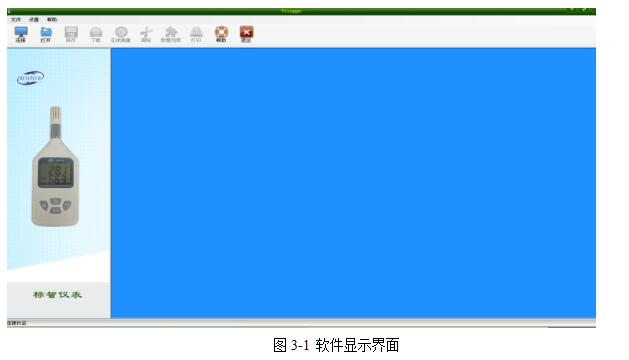
1、打开软件,出现如下界面
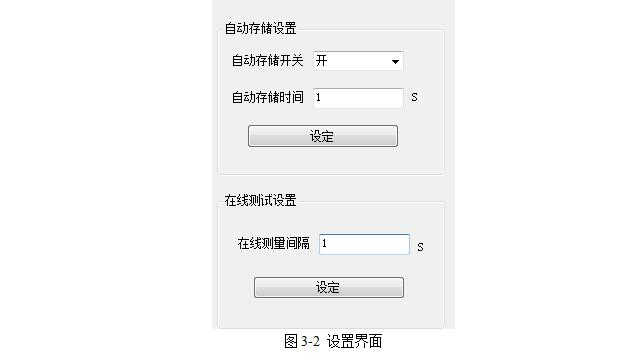
2、点击“连接”,出现设置信息界面,第一次使用,自动存储时间为在线测量的数据传送间隔时间或仪表离线记录的间隔时间。在线测量建议选择时间为1s,便于实时查看数据,离线记录可According to需要设定。第一次使用请合理设置。界面如下
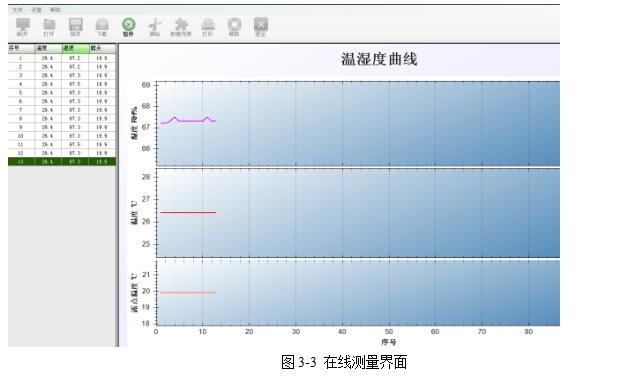
3、点击“在线测量”,仪表将According to设定的时间间隔传送数据到上位机软件,界面如下所示
4、点击“下载”,如仪表中已存有数据,将会传送到上位机分析显示,界面如下所示
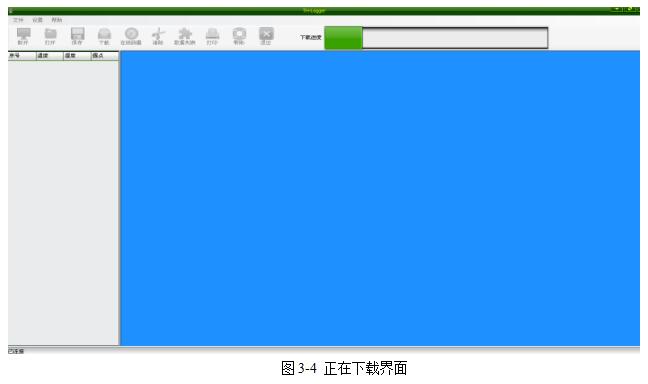
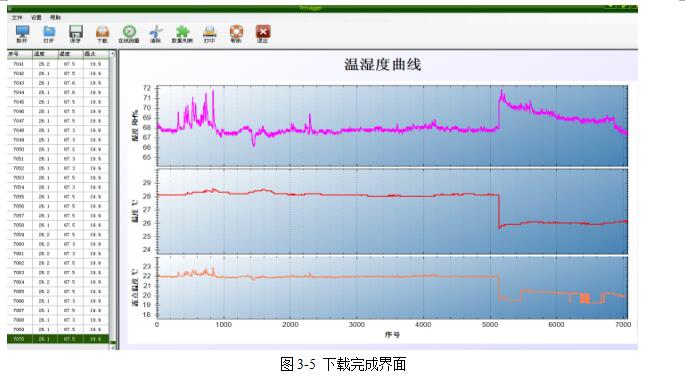
5、下载完毕后,将会显示数据列表与图形分析,如下图所示
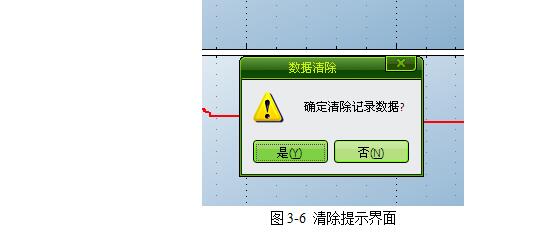
6、点击“清除”,将清除仪表内存储数据,如下图所示
7. Click "Save" to save the downloaded or real-time measured data locally for later analysis and query. The default format is Excel (*.xls) file
8. Click "Open" to open the locally saved data file without connecting, and use this software for analysis and display
9. Click "Print" to print the data in the data list. If the data volume is large, please preview it before printing and operate carefully to avoid paper waste. If you want to print the chart curve, please right click the mouse in the chart and select print according to the prompt
10. Click "Help", the help interface will be displayed
11. Click "Exit" to exit the system
Special Note
▲ The dew point temperature displayed by the GM1360A temperature and humidity measuring instrument and software is only for reference
▲Press the left mouse button on the chart and drag on a certain area to enlarge it partially
▲ Double-click the left mouse button on the chart to quickly restore all curve views
Precautions
4.1 Precautions
▲ Please do not use the host in liquid.
▲ The instrument adopts ABS engineering fireproof plastic shell, please prevent the corrosion of the shell by chemicals such as acid and alkali.
▲ If there is a fault, it needs to be repaired by authorized professionals, please do not repair or modify it by yourself. When replacing the battery, please strictly follow the steps in the manual when disassembling the body.
▲ The 9V dry battery equipped with this instrument cannot be charged, and short circuit is not allowed, otherwise it may be dangerous. Please dispose of waste batteries properly to protect the environment.
4.2 Common faults
①The LCD display is dim or unresponsive: the reason is that the battery power is insufficient or the ambient temperature is too low or too high.
Solution: replace the battery. If it is caused by the ambient temperature, please take the instrument out of the environment immediately to avoid damage to the instrument
