Electrical Specifications
Temperature unit:
°C Celsius or °F Fahrenheit, selectable by the user.
Measuring range:
K-TYPE(0.1°C)-200°C to 1372°C,
-328°F to 1999°F
Automatic shift:
0.1°C/1°C, 0.1°F/1°F
Accuracy:
±(0.1%rdg+1°C) at -60°C to 1372°C
±(0.1%rdg+2°C) at -60°C to -200°C
±(0.1%rdg+2°F) at -76°F to 1999°F
±(0.1%rdg+4°F) at -76°F to -328°F
Temperature coefficient:
From 0°C to 18°C and 28°C to 50°C, the specification is accurate for every increase or decrease of 1°C
speed increased by 0.1 times.
Operating environment:
0°C to 50°C (32°F to 122°F) <80% RH
Storage environment:
-20°C to 60°C (-4°F to 140°F) <70% RH
General Specifications
Low potential indication: When the "  " symbol appears, it means the battery voltage is low
at normal operating voltage.
Sampling rate: 2.5 times/second.
Batteries: 4 1.5V (SIZE AAA) UM-4 R03 batteries.
Battery life: 200 hours (carbon-zinc battery).
Dimensions: 16cm (H) x 8.3cm (W) x 3.8cm (D).
Weight: 240 grams (including battery and sheath).
Instructions for use
8. "MAX/MIN" key
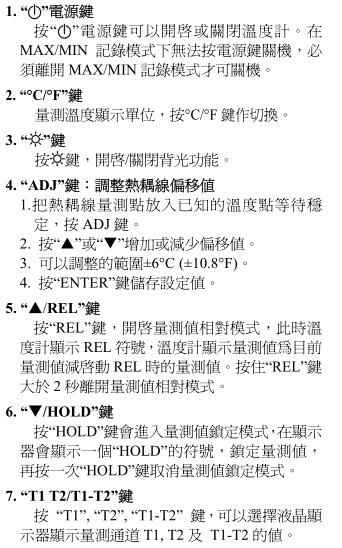
Press the "MAX/MIN" key to enter the MAX MIN recording mode , and the LCD will display the RECORD symbol at this time, press the "MAX/MIN" key to display the recorded maximum value MAX, and then press "MAX/MIN" key to display The recorded minimum value MIN, and then press the "MAX/MIN" key to display the recorded maximum value minus the minimum value MAX-MIN, and then press the "MAX/MIN" key to display the recorded average value AVG, which is cyclically displayed as above . Press the "MAX/MIN" key for more than two seconds to leave the MAX/MIN recording mode, and the RECORD symbol disappears.
Please note that when the MAX/MIN recording mode is activated, the power button cannot shut down the device, and the device can only be shut down after leaving the MAX/MIN recording mode.
9. ">2S APO /ENTER" key Press the "APO" key for more than two seconds to enable or disable the APO function . When the LCD displays the APO symbol, it means the APO function is enabled.
battery replacement
 1. If the “ ” symbol appears on the LCD , it means that the battery power is insufficient. Please replace the battery to maintain the accuracy of the test.
2. Loosen one screw on the battery cover of the thermometer, take off the battery cover, and replace it with four 1.5V (SIZE AAA) UM-4 R03 batteries.
3. When the TASI600 / 601 dual-input K thermocouple wire digital thermometer is not in use for a long time, please take out the battery from the thermometer and avoid storing it in a place with high temperature and high humidity.
clean
Periodically use a soft damp cloth dipped in a neutral detergent to gently wipe the case, do not use emery cloth or solvents with dissolving power to wipe.
