Introduction
This product is a Moisture Meter that can measure the moisture content of wood, and the test range is from 8% to 28%.
This product is a hand-held, easy-to-use, 3 1/2-digit (1999 maximum reading), rugged design digital Moisture Meter designed for one-handed operation.
Open the protective cover above the Moisture Meter, and you can see two probes to measure the moisture content of the wood. Press the "MEAS" key, insert the probe parallel to the grain of the wood, and read the value. The two probes are separated, the bottom is not connected, and the height of the probe is suitable for any depth you want to test.
Safety matters
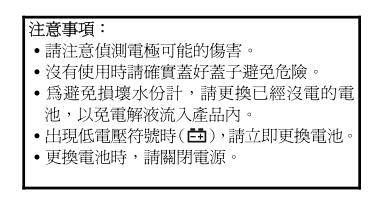
When not measuring, the protective cover of the probe should be covered. On the one hand, it can protect the user from being poked, and can also reduce the chance of probe breakage.
A new set of probe tips is attached for replacement when the probe tips used in this set are damaged.
General Specifications
Display mode: 3 1/2-digit liquid crystal display (LCD) indication, low battery indication: when the battery voltage is insufficient,  the symbol " " will be displayed.
Operating Environment: Temperature 0°C to 50°C (32°F to 122°F), <70%. Storage environment: temperature -20°C to 60°C (-4°F to 140°F) , relative humidity <80%. (The battery must be removed from the watch)
Power supply: 1.5Vx4 pcs (AAA size) UM-4 R03.
Battery life: 200 hours (carbon zinc battery). (under the condition of shutting down when not in use)
Size: 19cm (height) x4.4cm (width) x4cm (thick).
Teans TASI-680 wood Moisture Meter weight: about 170g (including battery).
Electrical Specifications
Test range: 8% to 28%.
Resolution: 0.01 inch or 0.1 inch can be selected.
Accuracy: ±2.0%.
(at temperature 23°C±5°C, relative humidity <75% environment)
Instructions for use
1. Open the probe protection cover, and insert the 2 probes into the wood .
2. Put it in at least 0.4 to 0.5 cm deep, press the "MEAS" button, turn on the power, and you can read the value.
3. When no button is pressed for more than 15 seconds, the Moisture Meter will automatically power off. At this point, just press the "MEAS" key again to restart the power supply.
4. Press and hold the "MEAS" button to perform continuous measurement .
5. When the reading is higher than 28%, the displayed value is not the real reading.
6. The “ ” symbol appears on the LCD , indicating “low battery ” and the battery needs to be replaced. Indicator light description “Lo” Green light – indicator light for “air dry”.
<< Less perishable>> "MID" yellow light─ "a little bit more than the standard value" indicator light.
<<Pay attention to the water content>> "Hi" red light ─ "too much water vapor" indicator light.
<<Perishable>>...be careful.
Precaution
There are several ways to minimize the influence :
1. Before the probe is inserted into the wood, wipe the surface of the wood with a damp cloth. The function is to release the electrostatic energy on the surface.
2. With the power off, insert the probe into the wood, and when ready , press the "MEAS" button to turn on the power, and the measured value can be read.
3. After inserting the probe, touching the metal part of the probe with your hand can also help to release the electrostatic energy .
battery replacement
1. If the “ ” symbol appears on the LCD , it means that the battery power is insufficient. Please replace the battery to maintain the accuracy of the test.
2. Loosen one screw on the battery cover of the thermometer, take off the battery cover, and replace it with four 1.5V (SIZE AAA) UM-4 R03 batteries.
3. When the TASI600 / 601 dual-input K thermocouple wire digital thermometer is not in use for a long time, please take out the battery from the thermometer and avoid storing it in a place with high temperature and high humidity.
clean
Periodically use a soft damp cloth dipped in a neutral detergent to gently wipe the case, do not use emery cloth or solvents with dissolving power to wipe.
