1 Replace the battery
A. When the battery symbol appears on the display, it means it is time to replace the battery.
B. Remove the battery cover and remove the battery.
C. Install the battery, pay attention to the positive and negative poles .
2. How to set the automatic shutdown time
The default factory setting of auto power off time is 5 minutes. Means that the instrument will automatically power off 5 minutes after the last operation. Users can change the time between 1-9 minutes through the following steps. Press the "POWER key" for about 4 seconds , let go when the "OFF" sign appears on the display, and then press the "MAX key" to preset the desired time. To disable the auto power off function, simply set the time to 0. In this way the instrument can only be switched off manually. Press the "ZERO key" to leave the time setting.
3. Accuracy verification
Before using, the FHT Fruit Hardness Tester should first verify The accuracy of the FHT can be easily verified by the following formula.
P=N/S where P is the FHT reading N is the force on the punch S is the force area Based on this formula, different models of instruments have different coefficients, as follows:
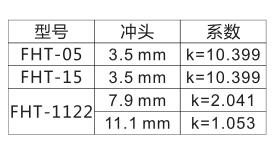
A force N is applied to the punch. When the reading is basically unchanged, press the "MAX key" to record the reading P, P satisfies the following equation:
P=k×N For example, when a force of 0.4 kgf is applied to HFT-05 or 15, the reading should be:
0.4×10.399=4.16
The maximum deviation is: ±(4.16×1%+0.1)=±0.14
So the correct reading should be:
4.16±0.14 =4.02~4.30 kgf
However, if 11.0kgf is applied to FHT-1122, the reading should be: 11×2.041=22.45
The maximum deviation is: ±(22.45×1%+0.1)=±0.32
So the correct reading should be: 22.45±0.32 =22.13~22.77kgf
If the deviation value is higher than the exact value, press and hold the "POWER key" until the "CO" mark appears on the display. It takes about 6 seconds to press. Then adjust the reading by " MAX key" (increase) and " UNIT key" (decrease)
P. Store the value and press the "ZERO key" to exit.
warn
Parts 2 and 3 are only designed for skilled professionals. It is not recommended for users to operate parts 8 and 9. Improper operation will cause the instrument to be inaccurate or even damage the instrument.
4. Connect to PC
A. Install the RS232C operating software on the PC .
B. Connect the instrument to the COM or USB port on the PC with an RS232C cable.
C. Run the software on the desktop, select the COM or USB interface in the system settings.
D. Click the Data Collection button, then click the Start/Continue button.
