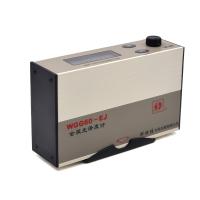
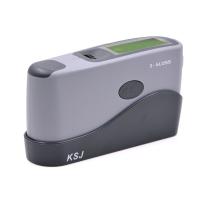
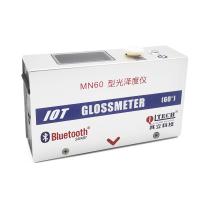
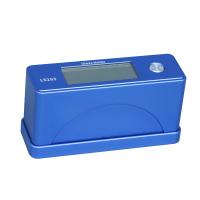
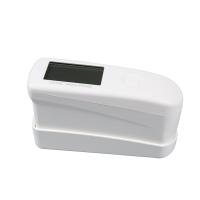
1. Instrument Characteristics
* The design and production of this product conform to the international ASTMD -523, ASTMD1455 ASTM C346, ASTMC584, ASTM D2457, DIN67530, ENISO7668, JISZ8741, MFT30064, TAPPIT480, Gb9754, GB/T13891, GB7706 and GB 8807 standards. The technical parameters conform to the standard of JJG 696-2002.
* Suitable for floor maintenance, surface cleaning and other surface gloss measurement.
* Gloss measurement of stones, ceramic tiles, surface
* Gloss measurement of surfaces such as paints, inks, paint overlays, wax films and automotive body paints.
* Surface gloss measurement of plastic, paper, etc.
* Surface gloss measurement of other non-metallic materials.
* Measurement is accurate and repeatable.
* With power supply undervoltage indication function.
* Fully intelligent design, fast measurement.
* There is a buzzer prompt during operation.
* Can store 254 sets of new measurement data.
* Precise, lightweight shape, easy to carry, automatic calibration , no need for manual adjustment.
2. Technical parameters
Accuracy: ±1.0 (relative to reference standard)
Resolution: 0.1
Repeatability: ±0.5 GU
Stability: less than ±0.4GU/30Min
Photometric unit: GU
Measuring range: 0~200GU
Indication error: less than ±1.2GU
Projection angle:
AG-106B: 60°
AG-126 B : 20° and 60°
AG-1268 B : 20°, 60° and 85°
Numerical memory: 254 groups
Measuring area: 7 x14mm (ellipse)
Ambient temperature: 0~40°C
Relative humidity: no more than 85%
Power supply: 3.7 V lithium battery
Dimensions: 136x44x78mm
Weight: about 350 g (not including battery
Standard configuration:
* Host
* Optical cleaning cloth
* Calibration standard gasket
* Power Adapter
* Carrying case
* user's Guide
Optional accessories:
* USB data cable
* RS-232C cable and software
* Bluetooth™ data output
4. Shutdown and Shutdown
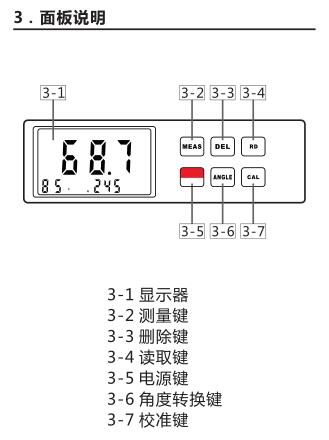
Press and hold the "3-5 power button" to turn on the machine; the machine is powered by a 3.7 V lithium battery. When the instrument displays "  ", it means that the power is insufficient and needs to be charged; the general charging time is about four hours.
5. Instrument Calibration
Put the sensor in the calibration box, and then press the "3-2 MEAS measurement key", the instrument will display the reading . Compare the measured value with the value on the standard block. If the two match, the measurement status of the instrument is accurate . If the measured value does not match the actual value, you need to tap the instrument to automatically calibrate and display Same data . Before each calibration, check the glossiness of the calibration sheet and the sensor ; make sure the surface is clean and free of dirt such as oil and dust.
6. Angle selection
85° is low gloss, 60° is medium gloss, and 20° is high gloss; lightly press the "3-6 ANGLE" angle conversion key to realize the conversion of the measurement angle.
7. Instrumental Measurements
Move the measurement window of the sensor to the position , press down on the sensor lightly with your hand, so that the sensor and the object to be measured are in close contact, and then press the " 3-2 MEAS measurement key", the display will display There is his measured value; the value displayed on the LCD within 2 seconds is the luminosity of the measured position. At the same time the value will be saved .
8. Data memory
测量完成后,测量的数据将保存到仪器里,储存的测量数值也随测量相应增加。本仪器能够储存 254组测量值。当储存达到极限时仪器自动更新测量值,并删除优先的数值。也就是说仅是储存新的的 254组数据。
9. 数据查看
当显示器上出现“M”符号时说明机子属于测量状态,按住“3-4 RD 读取键”进入浏览状态,此时显示器出现“R”符号。这时按“3-4 RD 读取键或3-7CAL校准键”,“3-2 MEAS 测量键”就可以浏览到储存的所有数据。最后 则可退出此菜单。
10. 数据删除
测量状态时,即显示器出现“ M ”符号,按住“3-3 DEL 删除键”即可删除新的储存的数据,同时储存的数据也跟着递减。当要删除系统所有的数据时,只需按住“3-3 DEL 删除键”不松手并持续 3 秒钟,直到显示器所有数据显示为000,这时说明仪器无任何存储数据信息。
11. 与计算机联机通讯
本仪器可通过可选附件 RS232 通讯电缆、软件和 USB 适配器与计算机连接。用来分析、保存打印数据,通过蓝牙可远距离传输数据等多项功能操作。
12. 关机说明
该仪器具有两种关机功能,当仪器处于闲置状态(既不测量,也没有任何按键操作)10分钟后,它会自动关闭以节省电池。按住 显示“ OFF ”时松手就会关机。
* The instrument should be placed in a safe and clean place after use to prevent damage or contamination.
* Please keep the ambient light directly shining on the measuring aperture when measuring. Especially in strong light, it is necessary to use a cloth to shade.
* When the temperature difference between the measurement environments is large, it will seriously affect the measured value. In this case, wait the temperature to equilibrate before calibrating the meter.
* If the measurement operation continues for a long period of time, such as one hour or more, then recalibration of the instrument .
* When the instrument is not used for a long time, it is recommended to charge it once . "3-5 Power button"
13. Instrument Maintenance
* The instrument should be placed in a safe and clean place after use to prevent damage or contamination.
* Please keep the ambient light directly to the measurement when measuring
aperture. Especially in strong light, it is necessary to use a cloth to shade.
* When the temperature difference between the measurement environments is large, it will seriously affect the measured value. In this case, wait the temperature to equilibrate before calibrating the meter.
* If the measurement operation continues for a long period of time, such as one hour or more, then recalibration of the instrument .
* When the instrument is not used for a long time, it is recommended to charge it once .