1. Features
data retention function
The light sensor and the instrument display body are separated. Skew adjustment function.
High light test.
Large LCD display, easy to read data clearly.
2. Specifications
Light sensor: silicon photodiode
Display: 31/2 digital LCD display with a maximum value of 1999, low battery display, over-range display: "OL" Test range scale: 0.1~19990Lux
Test range selection: 200/2000/20000Lux
Reading data accuracy (23℃±5℃)

Battery consumption: about 2mA
Response speed: 2.5 times/second
Oblique light receiving characteristics: 30°±3%60°±10%90°±30%
Operating temperature and humidity: 0°C~50°C/less than 80%RH (no condensation)
Storage temperature and humidity: -10°C~60°C/less than 70%RH (no condensation)
Power supply: battery 9VNEDA1604, IEC6F22, JIS006P
Dimensions: instrument body 148mm×71mm×36mm; light receiving part 85mm×67mm×32mm Weight: about 270g for the instrument and light receiving part (including batteries)
Accessories: instrument body; light receiving part; 9V battery (installation); manual; leather box
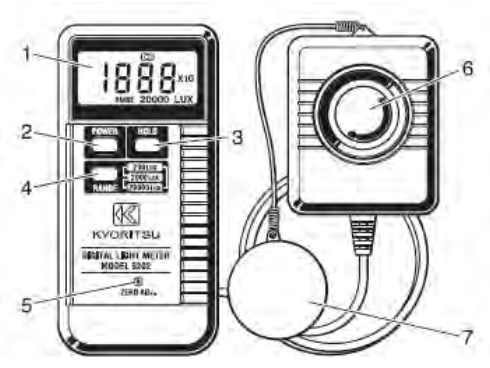 3. The name of each part of the panel:
 3. The name of each part of the panel:
1. LCD display
2. Power ON/OFF switch 3. Data retention switch
4. Range switch
5. Skew adjustment switch
6. Light sensor
7. Light sensor cover
4. Test method
4.1 Power ON
Press the "POWER" switch to turn on the light meter.
4.2 Select the appropriate range
Press the "RANGE" switch to select 200, 2000, 20000Lux.
4.3 Skew adjustment
If the display cannot display zero, in order to obtain accurate data, please use a screwdriver to adjust "ZEROADJ." to make the LCD display 000. 4.4 Light-receiving operation Take off the cover of the light-receiving sensor. Place the light sensor at the test point of the light source under test. The instrument will perform the test automatically.
Read the test value after the displayed reading is stable.
(Note: In order to improve the accuracy of the reading, please try to place the light sensor in a position vertically facing the test light source.
4.5 Data Hold Operation
The user can keep the current reading and press the "HOLD" key to fix the data on the LCD display.
When the retained data is no longer needed, press the "HOLD" button again to cancel the data retention function.
4.6 Attention
When the light-receiving sensor is not in use, please cover the cover of the light-receiving sensor to avoid lens wear.
Do not touch the light-receiving sensor (milky white part) with your hands
Use a dry flannel or equivalent when cleaning the light sensor.
Low battery warning A sign is displayed on the LCD when the battery voltage is lower than the operating requirement. At this time, in order to ensure the accuracy of the test, please replace the new battery in time.
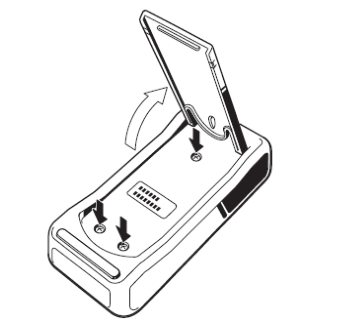
Replacement battery:
1. Lift up the stand on the back of the instrument.
2. Use a screwdriver to remove the 3 screws and replace with a new battery.
If not in use for a long time, please take out the battery.
Excess display
When the LCD displays the "OL" mark, it means that the scale value is exceeded, and the user needs to select an appropriate other range for testing.
This instrument is not suitable for testing luminosity over 20000Lux (for example: sunlight).
Please avoid testing in high temperature or humid environment.
