1. Product model and name:
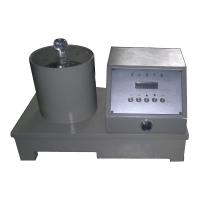
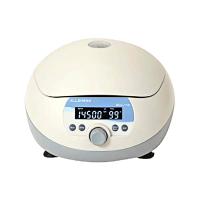
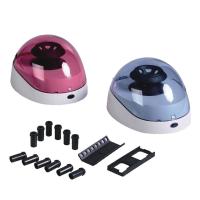
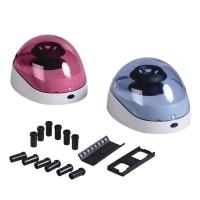
H1650 Desktop High Speed Centrifuge
2. Purpose and scope of use:
H1650 desktop high-speed centrifuge (hereinafter referred to as the machine) can be widely used in clinical medicine, biochemistry , genetic engineering, radioimmunology and other fields, and is a satisfactory experimental instrument for scientific research institutes and major hospitals.
3. Main technical parameters:
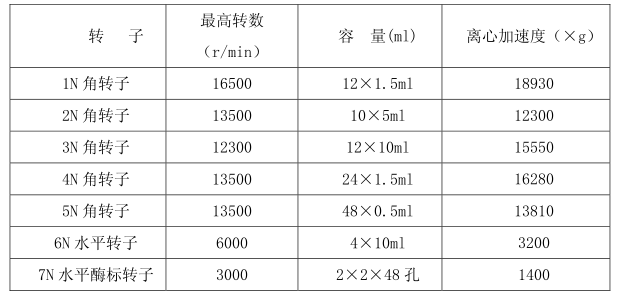
Maximum speed 16500r/min
Maximum centrifugal acceleration 18930×g
Maximum capacity 12×10ml
Power AC220V50Hz5A
Noise<65dB(A)
4. Rotor types and parameters
5. Main features
This machine adopts microcomputer control, touch panel, digital display, electronic door lock, DC brushless frequency conversion motor direct drive and other professional technologies. The speed adopts PWM speed regulation mode. Its characteristics are:
1. Due to the special shock absorber, the vibration reduction effect is good, and it has the function of automatic balance.
2. The speed adopts PWM control speed regulation method, the speed control precision is high, and it has the function of fast speed up and down. The fastest speed up time is 20 seconds, and the fastest speed down time is 18 seconds. Different speed-up and speed-down times can be selected, and the brushless DC variable frequency motor makes the whole machine run quietly, meeting the requirements of the laboratory, without changing the carbon brush, and without carbon powder pollution.
3. Time setting is accurate, in seconds;
4. Automatically calculate the RCF value;
5. With inching function (short-time centrifugal);
6. Electronic door lock safety protection function: when the door cover is not closed, the centrifuge cannot work.
6. Operating procedures:
1. Place the centrifuge on a flat table or platform, visually balance it, shake the centrifuge , and check whether the centrifuge is placed in balance.
2. Plug in the power socket and press the power switch (the power switch is on the back of the centrifuge, above the power base)
3. Press the "STOP" button, open the door cover, <the power is not connected, please use a small rod to insert >. Put the centrifuge tubes into the rotor. The centrifuge tubes need to be placed symmetrically in an even number (the test solution of the centrifuge tubes is uniform visually). Pay attention to tighten the nuts on the rotor body, and recheck the above steps. After finishing, rotate the rotor gently by hand. The body makes the centrifuge tube rack operate flexibly.
4. Close the door cover, be sure to lock the door cover tightly, and check whether the door cover is closed tightly after finishing.
5. Set the rotor number, speed, and time: In the stop state, the user can set the rotor number, speed, and time, and press the SET button. At this time, the centrifuge is in the setting state, the stop light is on, and the running light is flashing; In the state , the user can set the speed and time, and press the SET button. At this time, the centrifuge is in the setting state , the running light is on, and the stop light is flashing.
(1) Set the rotor, speed and time: When the centrifuge is in the stop state, press the "SET" key to enter the rotor, speed and time setting state, and then press the "▲" or "▼" key to confirm the current work of the centrifuge The rotor, speed, and time (up to 7 rotors, the highest speed is 16500r/min, and the longest time is 99 minutes); in the running state, only the speed and time can be set, and the operation is the same as above . Note: The corresponding rotor must be set at a corresponding speed, and it cannot be used at an overspeed, otherwise the test tube or rotor will be damaged.
(2) After the above steps are completed, press the "ENTER" key to confirm the rotor, speed and time set above , and then press the "START" key to start the centrifuge.
(3) During operation, if you want to check the centrifugal force, press the "RCF" key (the RCF light is on), the centrifugal force at the current speed will be displayed, and it will automatically return to the running state after 3 seconds; enter the setting when the centrifuge is running state, if you want to cancel the setting, press the "RCF" key to return to the running state.
6. When the centrifuge time counts down to "0", the centrifuge will stop automatically. When the speed is equal to 0r/min , the buzzer will beep 15 times. Press the "RCF" key to cancel the beeping.
7. When the rotor stops, the door cover will be opened automatically, and the centrifuge tube will be taken out. (If the door cover cannot be opened, please use a small rod to insert it into the small hole on the right side of the chassis to open the electronic lock)
8. Turn off the power switch and power off the centrifuge.
6. Matters needing attention:
1. Please read and keep this manual carefully.
2. The table on which the centrifuge is placed should be solid and flat, and the four rubber machine feet should be in contact with the table and be evenly stressed to avoid vibration.
3. The power supply needs to have a grounding wire to ensure that the centrifuge is effectively grounded through the power socket.
4. When the centrifuge is running, do not move the centrifuge. No items can be placed on the door cover to prevent damage to the items on the door cover when the door cover is automatically opened.
5. Add liquid to the centrifuge tube as evenly as possible by visual inspection. If the difference between the liquid addition is too large, it will cause large vibrations this time, stop the machine and check to make the liquid addition meet the requirements. The centrifuge tubes need to be placed in an even number and symmetrically.
6. If the centrifuge tube breaks during operation, it will cause large vibration and should be stopped immediately.