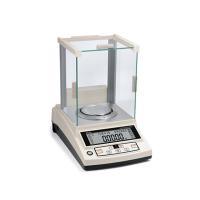
How does the one-ten-thousandth balance adjust its own sensitivity? Professionals from Tianjin Tianma Instruments pointed out that on the pointer of the one-ten-thousandth balance, there is a very inconspicuous small slider with a sense of weight, which is used to adjust the sensitivity of the one-thousandth balance. The sense weight moves upward, and the sensitivity of the one-ten-thousandth balance increases; the sense weight moves down, and the sensitivity of the one-ten-thousandth balance decreases. It turns out that the beam of the one-ten-thousandth balance together with the pointer is an object with a fixed rotation axis, and the rotation axis is the central knife edge O. When the masses in the two pans of the ten-thousandth balance are not equal, the crossbeam will be tilted at a certain angle θ. Let the masses in the two pans be m1 and m2 (m1>m2), the mass of the crossbeam is M, and its center of gravity O is on the pointer. Where the distance from O is h, the length of one ten-thousandth of the balance arm is L. According to the torque balance condition ΣM=0, m2gLcosθ+Mghsinθ=m1gLcosθ, the above formula shows that: under the condition of a certain mass difference (m1-m2) between the two discs, the larger the ratio L/M is, the smaller h is, and the larger θ is. That is, the higher the sensitivity of the one-tenth of a thousandth balance. Generally speaking, the L/M value of one ten-thousandth balance cannot be adjusted, and the height h of the center of gravity of the two beams can be changed by the position of the sensing weight: when the sensing weight moves upward, the center of gravity rises, and h decreases. Small, one ten-thousandth the sensitivity of the balance increases; otherwise, the sensitivity decreases. The sensitivity of the one-ten-thousandth balance should not be as high as possible, because at the same time as h decreases, the stability of the one-thousandth balance will become worse due to the increase of the center of gravity. At this time, the smaller the restoring torque Mghsinθ of gravity, the greater the stability become extremely bad. Therefore, sensitivity and stability should be considered at the same time when designing a one-ten-thousandth balance. So, how does the one-ten-thousandth balance adjust its own sensitivity? Let's listen to the interpretation of professionals.
Professionals pointed out that the method of adjusting the sensitivity of the one-ten-thousandth balance is as follows:
1. The one-ten-thousandth balance should be adjusted to the level and the program switch of the one-thousandth balance should be turned on.
2. Turn on the ten-thousandth balance and make the ten-thousandth balance display zero stably.
3. Press and hold the tare key, and the ten-thousandth balance will display "BUSYCAL and value (calibration weight value)".
4. Put the calibration weight equal to the value displayed at the third point on the weighing pan of the ten-thousandth balance. The error of this calibration weight should be less than 2%. If it is out of tolerance, a "positive sign" or "negative sign" will be displayed on the display. "Positive sign" means to increase the weight value; on the contrary, "negative sign" means to decrease the weight value, and the one-thousandth balance displays "BUSYCAL" and the corrected weight value.
5. After a while, the "g" symbol will appear on the display of the ten-thousandth balance accompanied by an audio signal.
6. Take off the calibration weight, and the one-thousandth balance will display the zero position later.
7. Turn off the ten-thousandth balance, and the display will display the word "STANDBY".
8. Press the "CAL" key with one hand, press the switch key with the other hand, and the one-ten-thousandth balance will display until "CH4".
9. Press the tare button again, and the ten-thousandth balance will display "CH4CAL".
10. Release the "CAL" key, and the ten-thousandth balance will display "BUSYGAL" and "0.0000g".
11. One ten-thousandth balance displays "0.0000gCAL".
12. Press the "CAL" key once, and the ten-thousandth balance will display "BUSYCALC".
13. "BUSYCALCC" will be displayed after a while.
14. Wait for one ten-thousandth balance to display zero.
15. If the 1/10,000th balance newly installs a parameter "EEPROM" memory, repeat steps 12 to 14 again.
16. Call page number 4 of the one-ten-thousandth balance program, and the display will display "41A or 42" cyclically.
17. When the program code 42 appears on the display, press the one-ten-thousandth balance tare button to make the ten-thousandth balance setting program "42▲".
18. When the last number of the program code is zero, press the tare key to restore the ten-thousandth balance to the zero position of the weighing program.
19. Return the program switch of the ten-thousandth balance to the locked position.