Oven alarm
The alarm icon flashes in the display. In the case of an audible alarm with activation of the buzzer (chapter. 7.6) the buzzer sounds.
• Safety controller class 2 ("temperature limiter")
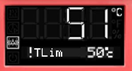
The alarm icon flashes in the display. In case of an alarm with the option to activate the buzzer (chapter. 7.6) the buzzer sounds.
The heating is off.
Reset alarm:
With optional buzzer alarm with activated buzzer: to silence the buzzer press the OK button.
The alarm icon is permanently illuminated for s because the cavity temperature has cooled below the safety controller set point. You can reset the alarm message on the controller. To do this, reset the alarm message in the safety controller menu with the OK button. The heat is released and the controller resumes tem-temperature control.
• Safety controller class 3.1 ("temperature protection")
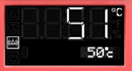
The alarm icon flashes in the display. In the case of an audible alarm with activation of the buzzer (chapter. 7.6) the buzzer sounds. The heating is off.
Reset alarm:
With the option activated Sound Alarm Buzzer: To Silence Buzzer Press the OK button.
After the cavity temperature has cooled down below the safety controller set point, you can reset the alarm message in the safety controller menu with the OK button, re-rent the heater, and the controller resumes temperature control.
Notice:
When the safety controller class 2 or class 3.1 is activated, you should disconnect the room from the power supply and have a professional check and correct the cause of the failure.