| View Ren's JENCO full range of pH meter products |
Prepare before use
A. Install the battery
When the “ ” symbol is displayed on the upper left corner of the LCD , please replace the battery. After this symbol is displayed, the whole machine can still work normally for about 2-3 hours.
1. See the exploded view of the replacement battery on the right.
2. Press the arrow "1" first, press the battery cover with your left thumb, and then press the arrow "2" with your right index finger to open the battery cover.
3. Take out the old battery and replace it with four new batteries . Be careful not to install the wrong polarity, and then put the battery cover back to ensure the normal waterproof function.
B. Immersion of Electrodes
1. Remove the protective cap from the pH 630 electrode.
2. Before the first use, please soak the electrode tip in 3M potassium chloride
Activated in liquid, soaking time more than 2 hours.
C. Setting and calibrating the electrode head and the whole machine
The pH 630 needs to be set and calibrated before first use.
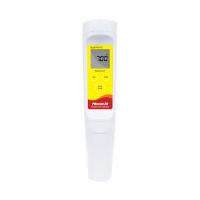
PH 630 Appearance


1. Standard solution and calibration point display
2. Low battery indicator
3. Calibration mode display
4. Lock mode display
5. pH reading
6. Temperature reading (°C)*
7. Temperature reading (℉)*
Operating modes and key operation
A. Mode of operation
The pH630 has 4 modes:
1. Measuring mode: used to measure pH value and temperature value.
2. Calibration mode: used to correct 1, 2 or 3 points.
3. Lock mode: used to lock the measured value.
4. Standard solution selection mode: used to select the standard solution group. (7.00/4.01/10.01) or 6.86(6.86/4.00/9.18).
B. Key operation

Instructions for use
A. Power on/off
Press the "On/Off" key to turn on the machine. If the machine is on, press the "On/Off" button again to turn off the machine. When the machine is not in use, it will automatically shut down after 30 minutes.
B. Select standard solution
1. 首先机器需要在测量模式。
2. 按“Cal”键 5 秒以上,机器显示 7.00 标准溶液组,你可以把标准溶液组由 6.86 标准溶液组(6.86/4.00/9.18)改为 7.00 标准溶液组(7.00/4.01/10.01)。
3. 再按“Cal”键 5 秒以上,机器显示 6.86 标准溶液组,你可以把标准溶液组由 7.00 标准溶液组(7.00/4.01 /10.01)改为 6.86 标准溶液组(6.86/4.00/9.18)。
注意: 这个操作不需重复操作,除非需要改变标准溶液组别。
C. pH 校正
使用者可选择1点、2点或3点校正。
1. 取下机器的电极帽,将机器的电极头部分用蒸馏水洗净并擦干,放入第一种标准溶液中,此时机器会显示此种标准溶液的温度。
按“Cal”键进入校正模式, 此时第一种标准溶液值将显示,“HOLD”显示将闪烁,当机器采样数据稳定后,此时,机器的“HOLD”显示将停止闪烁,并一直显示在屏幕上,此时再按“Enter”键存储此数值。稍等一会儿,机器将完成第一点校正,并准备第二点的校正。
[注意: 此时,按“Hold”键, 机器将离开校正模式,“单点校正”完成。]
2. 从第一种标准溶液中取出机器,将机器的电极头部分用蒸馏水洗净并擦干,放入第二种标准溶液中,此时机器会显示此种标准溶液的温度。
3. 此时,第一种标准溶液值将显示在屏幕上,第二种和第三种标准溶液值将在屏幕上闪烁,并且 “HOLD”显示将闪烁,当机器采样数据稳定后,此时,机器的“HOLD”显示将停止闪烁,并一直显示在屏幕上,此时再按“Enter”键存储此数值。稍等一会儿,机器将完成第二点校正,并准备第三点的校正。
[注意: 此时,按“Hold”键, 机器将离开校正模式,“两点校正”完成。]
4. 从第二种标准溶液中取出机器,将机器的电极头部分用蒸馏水洗净并擦干,放入第三种标准溶液中,此时机器会显示此种标准溶液的温度。
5. 此时,第一种和第二种标准溶液值将显示在屏幕上,第三种标准溶液值将在屏幕上闪烁,并且 “HOLD”显示将闪烁,当机器采样数据稳定后,此时,机器的“HOLD”显示将停止闪烁,并一直显示在屏幕上,此时再按“Enter”键存储此数值。稍等一会儿,机器将完成第三点校正,并自动退出校正模式。“三点校正”完成。

[注意: 如果要获取精密测量,建议更换电极后或每周都需校正一次。]
D. 测量
在“测量模式”把电极放入被测溶液中即可。
E. 锁定资料
1. 当pH 值稳定后,按一次“Hold”键就锁定读值了。
2. 再按一次“Hold”键,机器将回到“测量模式”,显示另一个测量值。
更换电极
1. 逆时针旋下电极头固定螺帽。
2. 将电极头(老化的)从电极插座上拔下。
3. Insert a new electrode head and make sure that the electrode head is in good contact with the whole machine.
4. Put the electrode tip retaining nut on and tighten clockwise.
5. Soak the electrode tip in 3M KCL soaking solution for 2 hours and re-calibrate.