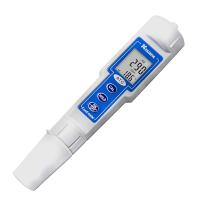
Key Description

1. MODE key: In the normal mode, press this key to select the display mode, which are: non-compensated conductivity, compensated conductivity, salinity and total dissolved solids (TDS). In the calibration mode, press this key to skip the current calibration parameter (not stored) and go to the next calibration parameter.
2. CAL key: In normal mode, press this key to enter calibration mode.
3. △ key: In calibration mode, press this key to increase the parameter value.
4. ▽ key: In calibration mode, press this key to decrease the parameter value.
5. ENTER key: In calibration mode, press this key to save the new parameter value.
6. ON/OFF key: Power on and off key, the last display status will be saved when the machine is turned off.
Replacement battery
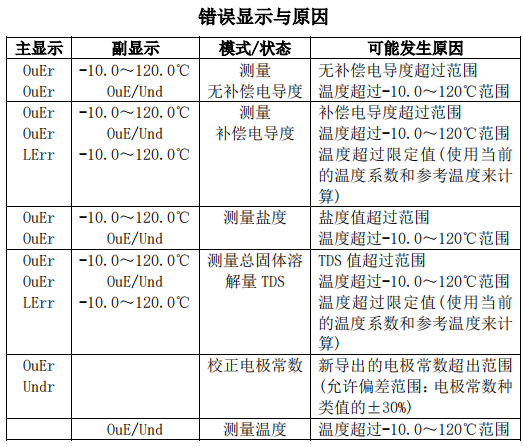
When "BAT" on the LCD flashes, it means that the power is insufficient, and the battery must be replaced or the external power supply must be checked . When the voltage is too low to maintain the normal operation of the machine, it will automatically shut down and display "Shut" prompt.
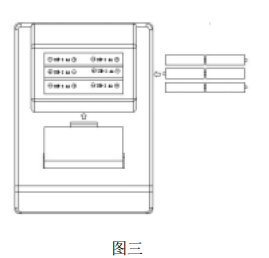
1. Remove the battery cover in the direction shown on the battery cover;
2. Take out 6 AA batteries, install new batteries, and pay attention to the correct polarity of the batteries;
3. Close the battery cover and make the buckle fasten
Switching on and off the instrument
Plug in the power supply, plug in the electrodes, and you can start the machine. After starting up, the instrument first displays the current cell constant type and K value, then displays the power percentage, and then is in the measurement state, and starts to automatically search for the range. When using, please pay attention that there are no , so as not to affect the accuracy of the measurement. When the instrument is not in use, please press the ON/OFF key to turn it off to prolong the battery life. The instrument will automatically switch .
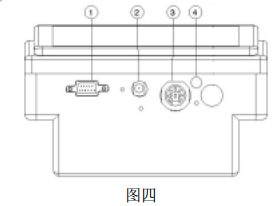
Connector

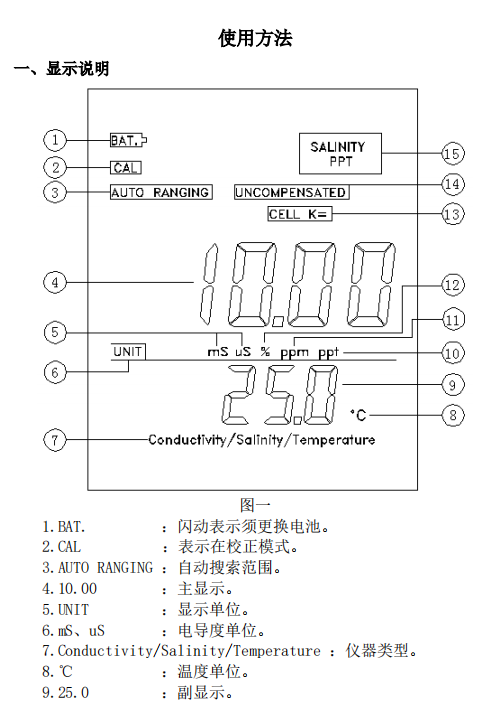
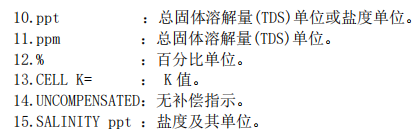
Explanation of display modes and display values

Calibration steps
1. Calibration Instructions
1. Calibration procedures must be performed when using a new machine or a new electrode;
2. The electrode has been used for a long time, resulting in a large measurement error or when a new electrode is replaced, a calibration procedure must be performed ;
3. To change the reference temperature or temperature coefficient, a calibration procedure must be performed.
2. Calibration procedure
1. After starting up, press the CAL key;
2.仪器会显示先前所设定的温度系数,按△或▽键改变温度系数到用户所希望的值;
3.按 ENTER 键保存新设定的温度系数(按 MODE 键不保存直接到下一步);
4.仪器会显示先前所设定的参考温度,按△或▽键改变参考温度到用户所希望的值;
5.按 ENTER 键保存新设定的参考温度(按 MODE 键不保存直接到下一步);
6.仪器会显示先前所选择的电极常数种类,按△或▽键改变电极常数种类到用户所用电极的常数种类;
7.按 ENTER 键保存新设定的电极常数种类,K 值将自动恢复为电极常数种类值(按 MODE 键不保存直接到下一步);
8.将电极放入已知电导度的标准液中, 仪器会显示标准液的补偿电导度值(其参考温度固定在 25℃,温度系数固定在 1.91%,此值的准确度须视目前仪器设定的电极常数与真正的电极常数之间的误差而定);
9.等待数秒钟,待读值稳定不再变动。

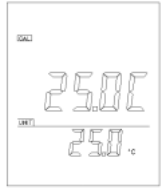

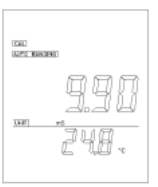
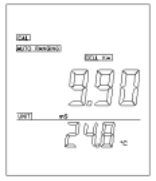
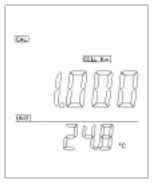
若采用输入电导值的方式校正,请按△或▽键,使仪器上显示的电导度值与标准液的电导度值(25℃时)相同;(若要手动选择 K 值,请直接按 MODE 键到第 11 步);
10.按 ENTER 键保存新校正的电极常数值(按 MODE 键不保存直接到下一步);
11. The instrument will continue to display the compensated conductance value of the standard solution, and CELL K= starts flashing; (if it has been calibrated by inputting the conductance value, please directly press the MODE key to exit the calibration mode); if you want to manually select the K value, Please press the △ or ▽ key, CELL K= lights up, the instrument will display the K value, continue to press the △ or ▽ key to adjust the K value, release the △ or ▽ key for 2 seconds, the instrument will continue to display the conductivity value;
12. Adjust the K value according to the above method until the conductivity value displayed on the instrument is the same as the conductivity value of the standard solution (at 25°C);
13. Press the ENTER key to save the newly set K value (press the MODE key not to save), and exit the calibration mode.
8. Measurement steps
Put the electrode into the solution to be tested, the instrument will display the "rAnG" prompt and automatically search the range of the conductivity value, press the MODE key to select a suitable display mode, and then measure.
9. Communication
MODEL 3173 adopts RS-232C interface to transmit data.
1. Prepare to connect
This machine can be connected with PC (100% IBM compatible) via DB-9 connector, using the RS-232C cable used for general interconnection (the wiring method should be as shown in the figure), after the connection, connect the two power Open.
2. Software
The attached disc contains a demonstration program , the user can use this program to track and record the current measurement data. For the communication protocol and process, please refer to the files on the disc.