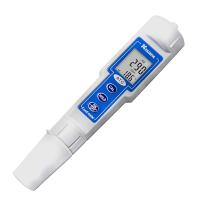
Use of MODEL 3321


【Notice】:
If the meter is not installed according to the above method, the meter may be damaged.
B. Front panel and key description
The display board of the whole machine has a four-digit LCD display and four mechanical switches.

1. [ MODE ] key:
1a. In the measurement mode, press this key to cycle through the display of conductivity value and temperature value or resistivity value and temperature value.
1b. In the setting mode, press and hold this button for three seconds, and the whole machine will return to the previous setting parameter.
2. [ UP ] key:
2a. In calibration mode, press this key to display the previous calibration item. In the setting mode, press this key to display the previous setting item or increase the value of the setting item.
2b. In the measurement mode, press this key and [ENTER] key at the same time, the machine will enter the calibration mode.
3. [ DOWN ] key:
3a. In calibration mode, press this key to display the next calibration item. In the setting mode, press this key to display the setting item or decrease the value of the setting item.
3b. In the measurement mode, press this key and [ENTER] key at the same time, the machine will enter the setting mode.
4. [ ENTER ] key:
In the calibration and setting mode, press this key to store the set parameters into the EEPROM memory, and enter the next page or next page of parameter setting


1. The range of AC power used by Model 3321 is 100~240V; 50/60HZ. When installing the machine, it is necessary to correctly connect the AC power to the terminal, and make sure that the "E" of the machine is fully connected to the ground of the AC power.
2. To correctly connect the relay output control line, it is necessary to confirm that it has been correctly connected to the terminal. The maximum load cannot exceed 5A/115V or 2.5A/230V.
E. Measurement Mode
After turning on the power and starting up, the whole machine will enter the measurement mode. The user can press the [MODE] key to select the conductivity, temperature display or resistivity, temperature display two modes.

1. Conductivity – Conductivity measurement mode, always display the test value of conductivity.
2. Resistivity – Resistivity measurement mode, displaying the test value of resistivity all the time.
3. 温度 – 温度测量模式,时时显示温度的测试值。
【注意】: 在测量模式按[MODE]键,显示将在电导率及温度或者电阻率及温度两种模式上切换
F. 设定模式
同时按住[DOWN]键和[ENTER]键,整机将进入设定模式。
1. 温度补偿模式的选择

在此界面,按[UP]键或[DOWN]键可循环切换两种温度补偿模式:01(热敏电阻:10k欧姆)、02(手动)。
选择正确的温度补偿模式后,按[ENTER]键存储,并进入下一个设定项目。
2. 温度系数的选择:

在此界面,按[UP]键或[DOWN]键可循环切换温度系数值:E2.00, E0.00。 选择正确的温度系数值后,按[ENTER]键存储,并进入下一个设定项目。
3. 电导电极常数的选择:

在此界面,按[UP]键或[DOWN]键可循环切换电导电极常数值:C1.00, C0.10 和 C0.01。(C1.00:K=1.00;C0.10:K=0.10;C0.01:K=0.01)
选择正确的电导电极常数值后,按[ENTER]键存储,并进入下一个设定项目。
4. 测量范围的选择:
在此界面,按[UP]键或[DOWN]键可循环切换不同电导电极测量范围值: CF01/0.000~1.999uS/cm, CF02/2.00~19.99uS/cm, CF03/0.05~0.50MΩ, CF03/0.50~19.99MΩ(电极常数 K=0.01) 或者 CF01/0.00~19.99uS/cm, CF02/20.0~199.9uS/cm(电极常数 K=0.10)或者 CF01/0.0~199.9uS/cm, CF02/200~1999uS/cm, CF03/2.00~19.99mS/cm (电极常数 K=1.00)。 选择正确的测量范围后,按[ENTER]键存储,并进入下一个设定项目。


5. 继电器1 高/低开关模式的选择:

在此界面,按[UP]键或[DOWN]键可循环切换高、低开关模式。 选择正确的开关模式后,按[ENTER]键存储,并进入下一个设定项目。
【注意】: 继电器开关控制的详细资料见“H. 继电器控制” 。
6. 继电器1设定值的设定:

7. 继电器1迟滞宽度的设定:

8. 继电器2 高/低开关模式的选择: 与 “继电器1 高/低开关模式的选择” 相同。
9. 继电器2设定值的设定:与 “继电器1设定值的设定” 相同。
10. 继电器1迟滞宽度的设定: 与 “继电器1迟滞宽度的设定” 相同。
G. 电导率/电阻率校正模式
Model 3321采用单点校正。
In the measurement mode, press the [UP] key and [ENTER] key at the same time, the whole machine will enter the conductivity/resistivity calibration mode, the "CAL" font will be displayed and a current measurement value of conductivity/resistivity will be displayed. Clean the conductivity electrode with deionized water and put the electrode into an appropriate standard solution. After the temperature is stable, press the [UP] key or [DOWN] key to adjust the current measurement value to the standard solution value, and then press the [ENTER] key storage. At this point, the conductivity electrode calibration of the standard solution is completed .
H. Relay control
1. Isolation voltage:
The maximum isolation voltage of the relay is 1500VDC, that is, the voltage difference between the contacts of the relay cannot exceed 1500 VDC.
2. Relay output load:
The output load between relay contacts is recommended not to exceed 5 amps/115 VAC or 2.5 amps/230 VAC, so as not to reduce life of the relay or damage the relay. This relay is only suitable for resistive loads.
3. Relay action, set point and hysteresis:

Assuming that the relay switching mode is set to HIGH (high point), the relay will open , and close (OFF) at the set point -1/2 of the hysteresis width.
Assuming the relay switching mode is set to LOW (low point), the relay will open close (OFF) at the set point +1/2 of the hysteresis width.