The specific operation process of Ronghua DHH-5-10 low temperature Water Tank :
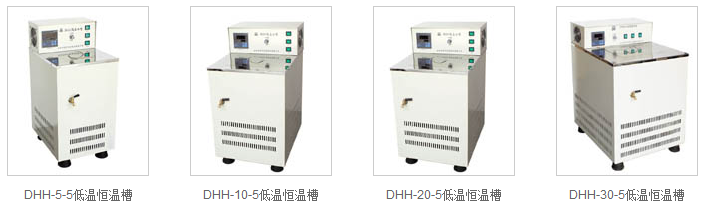
Instructions
This DHH-5 low-temperature Water Tank uses 220V AC power supply. Before use, please make sure that the rated current of the power socket is not less than 6A, and has a safety grounding device (please connect the grounding device in the work room when using it). When adding water, please note that the distance from the upper cover is not less than 8cm (adding water to a super constant temperature Water Bath). Soft water is required, preferably distilled water. Do not use hard water such as well water, river water, spring water, etc., to prevent the heating tube from bursting and affecting the constant temperature sensitivity. (Note that plug in the instrument socket first, and then plug in the power socket).
1. First turn on the power, turn on the circulating water pump, set the temperature, press the SET key to enter the temperature setting mode to set or view the set value, press the SET key to see the number flashing to indicate that it is in the setting mode, press the up button to increase the set value, down Press the button to decrease the setting value, press the left button to change the position, and keep pressing it will increase or decrease to the value you need. After setting, press the SET button to exit the setting mode and return to the normal working measurement mode.
2. Refrigeration manual and automatic mode switching Press the A/M button to switch the working mode of the compressor. The default is automatic. Press it once to switch to the normal open mode, press it again to enter the normal closed mode, and continue to press to return to the automatic control mode.
3. Adjust parameters
Sc: Press and hold the SET key for 3 seconds to enter the internal parameter setting adjustment interface. The interface displays Sc as the error calibration value, indicating the error between the measured value and the actual value of the temperature controller. The default is 0.0. You can press the SET key again , displaying the flashing number to enter the adjustment state (the setting method of the following parameters is the same), press the up or down button to adjust the value. (-9.9~9.9)
E: After setting, press the SET key to enter the next parameter adjustment. The interface displays E to indicate the advance of the breakpoint control (only effective when the P value is set to 0), the default value is 0.5, and the adjustment method is the same as Sc.
P: Press the SET key again to enter the third parameter, and the interface displays P to indicate the P value setting. The meaning of P value is roughly the start control temperature = set value - (10/P value). For example, if it is set to 50 degrees, when the P value is 10, it means that the control starts at 49 degrees, and when the P value is 4, it means that the adjustment starts at 47.5 degrees. If the temperature overshoot is too large during use, adjust the P value appropriately; if the temperature rises too slowly or never reaches the control temperature, adjust the P value appropriately.
Note: When the P value is 0, enter the breakpoint control mode. That is, the system PID is invalid, when the temperature is lower than (set value - E value), it starts heating, otherwise it stops heating.
c: Press the SET key to enter the setting of parameter c, the last parameter is temporarily reserved for the system, please do not adjust, the default value is 10.0.
AL: Press the SET key to enter the setting of the parameter AL, AL represents the opening value of cooling. That is, when the temperature > set temperature + AL, the refrigeration output is turned on.
AL2: Press the SET key to enter the setting of the parameter AL2, AL2 represents the cooling cycle difference. That is, when the temperature < set temperature - AL2, the cooling output is turned off.
TI: Press the SET key to enter the setting of the parameter TI, TI means timer, and the unit is minute. 0 means that the timing mode is off, otherwise, the instrument will enter the stop state after working for TI minutes, and stop the output of the load terminal. After all parameters are set, press the SET key to save the parameters and return to the normal working state.
If you need to quickly lower the working room temperature, please turn off or adjust the digital display temperature setting index, connect any end of the external latex tube to the ice water or tap water condensate nozzle, and connect the other end to the pool with the latex tube for circulating cooling. The water will condense quickly.
Precautions
1. Please read this manual in detail before use, and remember to add water to the water level before turning off the water nozzle, and then turn on the power.
2. Set the digital display temperature, turn on the power switch to heat up the Water Tank, cover the Water Tank cover, wait for the water temperature to rise to the required temperature value, turn on the cycle power switch, the water in the Water Tank will circulate and even the indoor temperature.
3. The water level should not be too high, in order to prevent the water from overflowing and cause experimental errors.
4. In order to prolong the service life of the Water Tank, please be careful not to let the control box get wet to prevent leakage.
5. The instrument is guaranteed to be repaired for one year from the date of delivery (man-made or improper use will charge the cost of work), long-term maintenance.
6. After use, please put away the water (spout), wipe it with a dry cloth, and place it in a ventilated and dry place.
