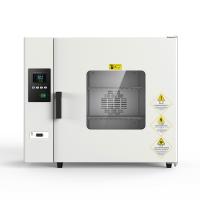
Instructions for use

panel indication

Indicator Definition
1. "RUN/AT" indicator light: this light is on when running, and goes off when the running is over; this light is flickering during self-tuning.
2. "OUT" indicator light: the light is on when there is heating output, otherwise it is off.
3. "ALM" indicator light: this light will be on when the over-temperature alarm occurs, otherwise it will be off.
Operation and usage
1. When the controller is powered on, the upper row of the display window will display "graduation number (P, C, K, S)", and the lower row will display "range value", and it will enter the normal display state after about 3 seconds.
2. Reference and setting of temperature and constant temperature time
Click the "Setting" button to enter the temperature setting state, the prompt "SP" will be displayed on the lower row of the display window, and the temperature setting value will be displayed on the upper row (the first digit flashes), as shown in Figure 1. , decrease key to modify to the desired setting value; then click the "Setting" button to enter the constant temperature time setting state, and the prompt "St" will be displayed in the lower row of the display window, as shown in Figure 2. The upper row will display the constant temperature time setting state. The fixed value (the one digit value flashes first), can be modified to the desired set value through the shift, increase, and decrease keys; then click the "Set" button to exit this setting state, and the modified setting value is automatically saved .

When ET=0, there is no timing function, and the set time is not displayed. When the constant temperature time is set to "0", it means that there is no timing function, the controller runs continuously, and the lower row of the display window displays the temperature setting value; when ET=1, the lower row of the display window displays the running time, and the lit decimal point flickers , the meter is powered on, and the timer starts counting. When ET=2, the lower row of the display window displays the running time, and the lit decimal point flickers, and the timer starts counting when the measured temperature reaches the set temperature.
If En=0, the time is up, the operation is over, the lower row of the display window will display "End", the buzzer will sound for 30 seconds, and all outputs will be turned off;
If En=1, the time is over, the display window will display the running time, the buzzer will sound for 30 seconds, and the temperature will continue to be constant;
After the operation is over, press and hold the "shift/rerun" button for 3 seconds to restart the timer operation.
3. When an over-temperature alarm occurs, the buzzer will sound continuously and the "ALM" alarm light will be on. If an over-temperature alarm occurs due to changing the temperature setting value, the "ALM" alarm light will light up, but the buzzer will not sound.
4. Press any key to silence the buzzer when it sounds.
5. "Shift/Auto-tuning" key: Long press this key for 6 seconds in the non-setting state to enter or exit the system self-tuning; click this key in the setting state to make the set value shift and flash to modify.
6. "Decrease/Rerun" key: In the non-setting state, when the operation is over, press and hold this key for 3 seconds to restart the operation; Press the key continuously to set the value.
7. "Increase/Backlight" button: Click this button in the non-setting state to turn on or off the backlight of the LCD screen (this function is only available for LCD series); click this button in the setting state to increase the set value, long press This key can make the set value increase continuously.
8. In the setting state, if no key is pressed within 1 minute, the controller will automatically return to the normal display state.
9. If "----" is displayed on the upper row of the display window of the controller, it means that the temperature sensor or the controller itself is faulty, please check the temperature sensor and its wiring carefully.
System self-tuning
When the temperature control effect is not satisfactory, the system can be self-tuned. During the self-tuning process, the temperature will have a large overshoot, and the user should fully consider this factor before performing the system self-tuning.
Press and hold the "Shift/Auto-tuning" button for 6 seconds in the non-setting state to enter the system self-tuning program, the "RUN/AT" indicator light flashes, and the indicator light stops flashing after the self-tuning is over, and the controller will get a Set better system PID parameters, and the parameter values are automatically saved. During the system self-tuning process, press and hold the "Shift/Auto-tuning" key for 6 seconds to stop the self-tuning procedure.
If there is an over-temperature alarm during the system self-tuning process, the "ALM" alarm light will not light up, and the buzzer will not sound, but the heating alarm relay will be automatically disconnected. The "SET" key is invalid during the system self-tuning process. During the system self-tuning process, regardless of whether there is a constant temperature time setting, the lower row of the controller display window always displays the temperature setting value.
Reference and setting of temperature internal parameters
Press and hold the setting button for about 3 seconds, the lower row of the controller display window will display the password prompt "Lc", as shown in Figure 3, the upper row will display the password value, and modify it to the required password value by increasing, decreasing and shifting keys. Then click the setting button, if the password value is incorrect, the controller will automatically return to the normal display state, if the password value is correct, it will enter the temperature internal parameter setting state, and then click the setting button to modify each parameter in turn. Then press and hold the set button for 3 seconds to exit this state, and the parameter value will be saved automatically.
Internal parameter table -1

Internal parameter table -2

Internal parameter table -3 (this parameter table is standard for LCD series, and optional for digital series)

Communication connection (32 controllers of this series can be connected at the same time)