Operation and usage
1. When the controller is powered on, the display window on the left will display "graduation number and version number", and the display window on the right will display "maximum temperature setting value" for about 3 seconds before entering the normal display state.
2. Reference and setting of temperature and constant temperature time
1) If there is no constant temperature timing function:
Click the "Setting" button to enter the temperature setting state, the left row of the display window will display the prompt "SP", and the right row will display the temperature setting value (the first digit flashes). Modify to the required setting value; then click the "Setting" button to exit this setting state, and the modified setting value is automatically saved.
2) If there is a constant temperature timing function
Click the "Setting" button to enter the temperature setting state, the left row of the display window will display the prompt "SP", and the right row will display the temperature setting value (the first digit flashes), the modification method is the same as above; then click "Setting" key to enter the constant temperature time setting state, the left row of the display window will display the prompt "ST", and the right row will display the constant temperature time set value (the first digit flashes); then click the "Setting" button to exit this setting state , the modified setting value is automatically saved.
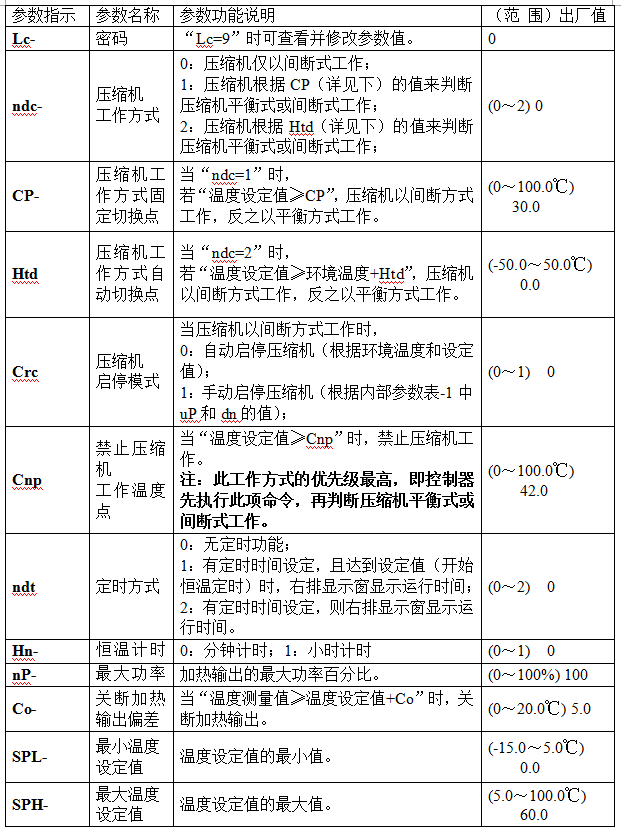
When the constant temperature time is set to "0", it means there is no timing function, the controller runs continuously, and the right display window displays the temperature set value; when the set time is not "0", the right display window displays the running time or temperature Set value (refer to the running time display mode (value of parameter ndt) in VII. Internal parameter table-2), when displaying the running time, the decimal point of the right display window lights up, and wait until the measured temperature reaches the set temperature , the timer starts counting, the decimal point in the right display window flashes, when the timing is up, the operation ends, the right display window displays "End", and the buzzer beeps for 1 minute and then stops beeping. After the operation is over, press and hold the "Down" button for 3 seconds to restart the operation.
Note: If the temperature setting value is changed during the timing process, the meter will restart timing from 0.
3. Abnormal sensor alarm
If the display window on the left side of the controller displays "---", it means that the temperature sensor is faulty or the temperature exceeds the measurement range or the controller itself is faulty, the controller will automatically cut off the heating output, the buzzer will sound continuously, and the alarm light will be on. Sensors and their wiring.
4. When an over-temperature alarm occurs, the buzzer beeps and beeps, and the "ALM" alarm light is on. If an over-temperature alarm occurs due to changing the temperature setting value, the "ALM" alarm light is not on, and the buzzer does not sound .
5. Press any key to silence the buzzer when it sounds.
6. In the setting state, if no key is pressed within 1 minute, the controller will automatically return to the normal display state.
Reference and setting of temperature internal parameters
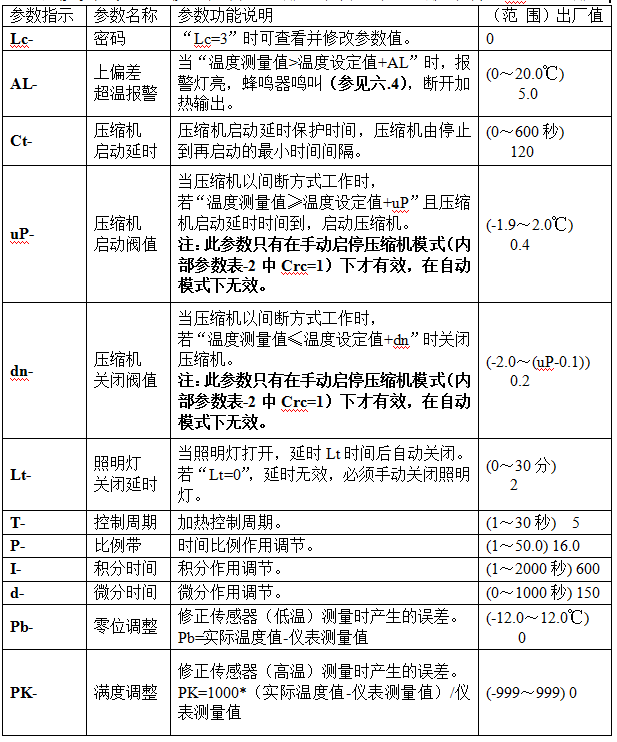
Press and hold the setting button for about 3 seconds, the left row of the display window of the controller will display the password prompt "Lc", and the right row will display the password value. Use the increase, decrease and shift keys to modify the required password value. Then click the setting button, if the password value is incorrect, the controller will automatically return to the normal display state, if the password value is correct, it will enter the temperature internal parameter setting state, and then click the setting button to modify each parameter in turn. Then press and hold the set button for 3 seconds to exit this state, and the parameter value will be saved automatically.
Internal parameter table -1
Internal parameter table -2
Internal parameter table -3