Instructions
1 5.1 Startup and shutdown
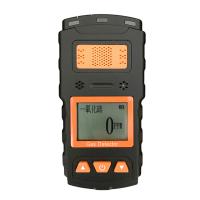
5.1.1 Start-up: In the off state, press and hold the [on/off key] to automatically start the device, the LCD screen lights up, enter the start-up interface, the air pump starts to work, and enter the normal detection interface. Such as (Figure 5.1-1)

The content displayed on the toolbar above the normal detection status interface includes: real-time gas pump status, battery power status, and gas concentration status.
① Long press the [left button] to turn on or off the air pump;
② Press and hold the [Down key] to enter the menu interface;
③ Short press the [up button] to check the time, date, and power.
5.1.2 Shutdown: On the normal detection status interface, press and hold the [Power On] button until the countdown on the screen , then release the button to shut down the device.
Note: When the device is turned off, the battery will also discharge naturally. If the device is not used frequently, please make sure to charge it once a week or so, otherwise it will affect the battery life.
2 5.2 Parameter setting
On the normal detection interface, long press the [Down key] to enter the "Parameter Setting" interface and set related parameters. Such as (Figure 5.2-1)
In the parameter setting interface, select "Time", "Backlight", "Air Pump", "Record" and "Advanced" through the [Up/Down/Left/Right Key] , and click the [On/Off Key] to enter the relevant interface for parameter setting.

5.2.1 Time setting: In the parameter setting interface, select "Time" through the [Up/Down/Left/Right Key] , and click the [On/Off Key] to enter the "Time Setting" interface to adjust the device time. Such as (Figure 5.2-2)

Use [left/right button] to select the item to be set, [up/down button] to adjust to the correct value, click "save" to save the setting and exit the interface, click "return" to return to the parameter setting interface without saving the setting.
5.2.2 背光设置:在参数设置界面,通过【上/下/左/右键】选择“背光”点击【开关键】进入“背光设置”界面,调整设备屏显亮度。如(图 5.2-3)通过【左/右键】选取需要设置的项目,【上/下键】调整相关的数值,点击“保存”保存设置并退出界面,点击“返回”不保存设置并返回参数设置界面。
5.2.3 气泵设置:在参数设置界面,通过【上/下/左/右键】选择“气泵”点击【开关键】进入“泵速设置”界面,调整泵吸速度。如(图 5.2-4)

通过【左/右键】选取需要设置的项目,【上/下键】调整相关的数值,点击“保存”保存设置并退出界面,点击“返回”不保存设置并返回参数设置界面。
5.2.4 记录设置:在参数设置界面,通过【上/下/左/右键】选择“记录”点击【开关键】进入“记录间隔”界面,可设置检测记录的时间间隔。如(图 5.2-5)通过【左/右键】选取需要设置的项目,【上/下键】调整相关的数值,点击“保存”保存设置并退出界面,点击“返回”不保存设置并返回参数设置界面。
5.3 高级设置
在参数设置界面,通过【上/下/左/右键】选择“高级”点击【开关键】进入“高级设置”界面,可进行“传感器”、“报警”、“零点”、“校准”等设置。如(图 5.3-1)

5.3.1 传感器设置:在高级设置界面,通过【上/下/左/右键】选择“传感器”,点击【开关键】进入“传感器设置”界面,可对气体的类型、量程以及精度进行设置。如(图 5.3-2)

通过【左/右键】选取需要设置的项目,【上/下键】调整相关的数值,点击“保存”保存设置并退出界面,点击“返回”不保存设置并返回“高级设置”界面。
5.3.2 报警设置:在高级设置界面,通过【上/下/左/右键】选择“报警”,点击【开关键】进入“报警设置”界面,可设置两级报警值,默认低报值为:20,高报值为:50。如(图 5.3-3)通过【左/右键】选取需要设置的项目,【上/下键】调整相关的数值,点击“保存”保存设置并退出界面,点击“返回”不保存设置并返回“高级设置”界面。
5.3.3 零点设置:在高级设置界面,通过【上/下/左/右键】选择“零点”,点击【开关键】进入“零点设置”界面,可进行自动调零。如(图 5.3-4)

零点设置需要在洁净空气中进行,观察气体数值,若数值不为 0,则可进行零点标定。点击“保存”保存设置并退出界面,点击“返回”不保存设置并返回“高级设置”界面。
5.3.4 Calibration settings: In the advanced setting interface, select "Calibration" through the [Up/Down/Left/Right Key] , and click the [On/Off Key] to enter the "Calibration" interface. For example (Fig. 5.3-5) firstly select the "calibration segment" ( 1-10 digits above the display) that needs to be calibrated by [left/right key], move to select "calibration gas" by [up/down key], and click [Switch key] to confirm the option, wait until the value turns red, adjust the value to be the same as the prepared standard gas through the [Up/Down key], click the [On key] to confirm, enter the standard gas, click "Start", and wait for the device to display the value After stabilizing (the AD position displays a blue "OK!") , move the [Up/Down key] to select "Enable", and [Left/Right key] enable the current calibration segment to complete the calibration. Click "Save" to save the settings and exit the interface, click "Back" to return to the "Advanced Settings" interface without saving the settings.
Note: ① Gas calibration needs to be carried out on the premise that the standard gas is ready. Do not calibrate without the standard gas.
② The value of the AD bit is the automatic matching value of the equipment, and non-professionals are not allowed to change the value at will in order to damage the equipment.
4 5.4 Turn on//off the air pump
In the normal detection status interface, press and hold the [left button] until you hear the air pump working, release the button, and the air pump will start; press and hold the [left button] again to turn off the air pump.
5 5.5 Record query
On the normal detection interface, long press the [up key] to enter the "record query" interface to query detection records. Such as (Figure 5.5-1)

In the record query interface, select the corresponding option through [Up/Down/Left/Right key], and click the [On key] to select or cancel to query the detection record.
Common faults and solutions