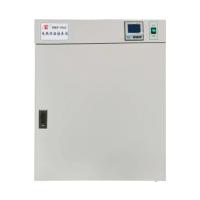
1. Scope of application
It is the necessary equipment for storage of strains and biological cultivation in medical and health, medicine, biology, agriculture, scientific research and other departments.
2. Technical indicators
model | 9025 | 9052 | 9082 | 9162 | 9272 |
voltage | 220V 50Hz | ||||
Power consumption | ≤150W | ≤250W | ≤300W | ≤400W | ≤600W |
Temperature control range | room temperature +5~65℃ | ||||
temperature fluctuation | ±0.5℃ | ||||
studio size | 250*250*250 mm | 350*350*410 mm | 400*400*500 mm | 500*500*650 mm | 600*600*750 mm |
3. Structure overview
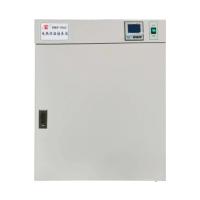
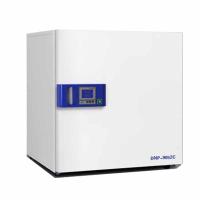
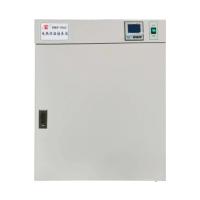
The appearance of the electric constant temperature Incubator is vertical, the box body and the outer box door are made of high-quality steel plates, the surface is baked or sprayed with plastic, and the outer door has an observation window, which is made of toughened glass, so that the cultured items in the box can be clearly observed from the outside. The studio adopts steel plate or stainless steel plate, the shelf can be moved easily, and the height of the partition can be changed arbitrarily. A silicon rubber sealing ring is installed between the working room and the toughened glass to ensure the sealing of the chamber door and the working room. Three flat heaters are installed on the left, right and bottom of the outer wall of the working room. The chamber shell and the studio are filled with ultra-fine glass wool for heat insulation.
The power switch, power indicator light, and temperature controller are all set on the upper part of the Incubator. The temperature controller has high temperature control accuracy. The set temperature and the temperature in the box are both digitally displayed. The set temperature is equipped with a protection device and has a tracking function. Alarm function.
4. How to use
1. Turn the power switch to "1", at this time the power indicator light is on, and the digital display on the temperature controller.
2. Adjust the set temperature of the temperature controller, the heating indicator light is on, and the heating starts. The method is as follows:
Turn the power switch to "on", about 7 seconds, the upper part of the temperature controller will display the temperature in the box, and the lower part will
The part is to set the temperature, press the button once, the upper row will display SP, press the or button to make the lower row display the required set temperature, and press the button again, the upper row will display ST (press the or button to make the lower row display the required timing time , when ST is set to 0, the meter cancels the timing function, when ST is not set to 0, the meter has the timing function), press the button again, return to the standard mode, the temperature controller setting is over, and the instrument can work normally . Under normal circumstances, the temperature control enters a constant temperature state after heating for 90 minutes.
3. Open the door, put the items to be cultivated into the Incubator, and close the door. If the door is opened for too long, the temperature in the box will fluctuate, which is a normal phenomenon.
4. During the cultivation period, it is better not to open the door of the box unless you put or take the items in the box, so as not to affect the temperature.
5. Select the cultivation time according to the needs. After the cultivation, turn the power switch to "0". If you don't take out the items immediately, please don't open the door.
5. Matters needing attention
1. The shell of the Incubator needs to be effectively grounded to ensure safe use.
2. The Incubator should be placed in a well-ventilated room, and flammable and explosive materials should not be placed around it.
3. The items in the box should not be overcrowded, and need to be left in the space.
4. The inside and outside of the box should be kept clean. If it is not used for a long time, it should be covered with a plastic dust cover and placed in a dry room.
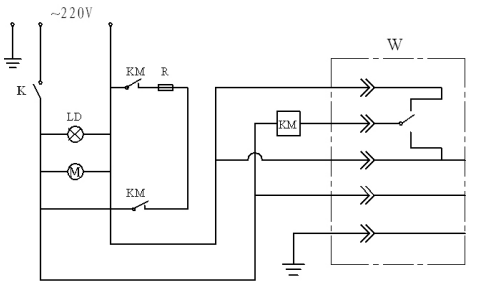
6. Electrical principle wiring diagram
7. Troubleshooting
Phenomenon | reason | deal with |
1. No power supply | 1. The plug is not plugged in or disconnected 2. The fuse is open | 1. Insert the plug or connect the ground 2. Change the fuse |
2. The temperature in the box does not rise | 1. Set the temperature low 2. The electric heater is broken 3. The temperature controller is broken | 1. Adjust the set temperature 2. Replace the electric heater 3. Replace the temperature controller |
3. There is a large difference between the set temperature and the temperature in the box | 1. The temperature sensor is broken 2. The setting temperature trimmer potentiometer is not adjusted properly | 1. Replace the temperature sensor 2. Adjust the trimmer potentiometer |
4. Abnormal over-temperature alarm | 1. Set the temperature low 2. The temperature controller is broken | 1. Adjust the set temperature 2. Replace the temperature controller |