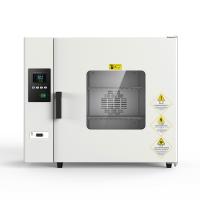
Installation requirements and usage methods
1. Please place the Drying Oven in a room with good ventilation and no strong vibration;
2. Please place the drying box horizontally, and the back of the Incubator should be at least 10cm away from the wall to ensure sufficient heat dissipation of the drying box to prolong the service life of the product;
3. Do not place flammable or explosive items around the drying box;
4. The power supply of the equipment should have sufficient capacity, and there should be a reliable grounding terminal to ensure safe use.
5. Special reminder: Do not place the drying box on the wooden floor or wooden workbench, so as not to cause fire!
Instructions
1. Temperature controller panel layout instructions
1 SET key is used for parameter setting;
2 Move keys are used for parameter setting movement;
3 The minus key is used for parameter modification;
4 Add key for parameter modification;
5 LCD display shows various types (for display status);
6 Data collection port.
2. Set the temperature
Press the power switch to the "on" position, and the drying box enters the working state. The LCD screen displays various prompts and parameters.
1) Press the SET key to enter the main control setting state, the digit of the set value is flashing, use the movement key to move the flashing number, press the plus and minus keys to set the required temperature .
2) Press the SET key again and the current value will display "SEL" (you can enter the next program only after entering the password).
3) Press the SET button again, the current value will display the temperature in the box, and the set value will display the set value. At this time, the temperature has been set and can be used.
3. About how to correct the temperature difference between the temperature in the box and the displayed temperature:
Prerequisites: The device has the function of correcting the temperature, because the device varies with the region, climate, and use environment. When you perform temperature detection, you may find that: the temperature measured by the temperature detection equipment (such as: thermometer, etc.) in the box If there is a difference between the temperature (called actual temperature) and the temperature displayed by the temperature controller (called display temperature), if they do not match or have a large difference, the temperature can be corrected and adjusted.
4. Temperature correction method:
1. When the state is displayed, press the "SET" key twice, the current value: display the SEL state, the set value: press the plus and minus keys to set the correction password 11.
2. Press the "SET" key again to enter the temperature parameter setting mode, the current value: display as SC.
3. Adjust the value of the set value. If the actual temperature (the temperature measured by the thermometer) is different from the displayed temperature, then subtract the temperature value displayed by the instrument from the value measured by the studio thermometer, and the result is the actual value of "SC". correction value. If the actual temperature of the working room is lower than the temperature displayed by the meter, then the corrected value is a negative value, otherwise it is a positive value.
4. After setting, press and hold the "SET" button again, the current value displays "HL", which is the slope correction setting, do not change the default value (1000), and then press the SET button to return to the display state, at this time the temperature has fix it.
Note: Judgment premise
1. The thermometer needs to be measured after passing the inspection by the testing department.
2. The measurement installation position of the mercury thermometer: please suspend the thermometer in the center of the inner cavity, and it cannot be directly placed on the partition for measurement.
5. Setting of upper limit temperature alarm:
a) Press the SET key twice to enter the main control setting state, the current value displays SEL, the set value displays 0000, and a digital tube starts to flash.
b) Press "△" to input the password 0001, when the set value displays the password "0001", press the SET key again, the current value displays AL1.
c) Press the SET key again, the current value displays T, and then press the "△" or "▽" key to set the upper limit temperature alarm value.
d) Press "SET" continuously to return to the display state.
6. Time setting:
The timing range of this device is 0-999 minutes, and the minimum setting time is 1 minute. When the setting time is zero, the device is working continuously. If you want to reset the time, you can turn off the power and restart it. The specific setting method is as follows:
a) Press the SET key twice to enter the main control setting state, the current value displays SEL, the set value displays 0000, and a digital tube starts to flash.
b) Press "△" to input the password 0001, when the set value displays the password "0001", press the SET key again, the current value displays AL1.
c) Press the SET key again, the current value displays T, and then press the "△" or "▽" key to set the required timing time.
d) Press "SET" continuously to return to the display state. When the instrument is working, the timing function starts, and the timing starts after the temperature is constant. After the time is over, the heating output is turned off, and the temperature begins to return to room temperature.
7. Self-tuning function:
In order to ensure the temperature control accuracy of the Drying Oven, it is necessary to start the self-tuning function of the instrument, so that the technical parameters and temperature rise curve in the controller can be adjusted to the best state under the ambient temperature of the equipment, so as to achieve accurate temperature control.
Note:
Special reminder: when you have a large change in the external environment temperature (greater than 20 degrees), you need to start the self-tuning function.
Operation of the self-tuning function
After setting the temperature to the desired temperature, press "▽" for more than 10 seconds in the display state, at this time the self-tuning indicator light is on, and the self-tuning state starts. When the self-tuning is over, it will automatically enter the normal working state. During the self-tuning process, the meter does not respond to any operation. To stop the self-tuning, please turn off the power.
Special reminder: Do not cut off the power supply and open the door of the box during the self-tuning process. If the self-tuning is interrupted abnormally, the self-tuning process will be invalid and the original parameters will not be changed.
Precautions
1. The shell of the drying box needs to be effectively grounded to ensure safe use.
2. The drying box should be placed in a well-ventilated room, and no flammable and explosive items can be placed around it.
3. There is no explosion-proof device in the drying box, and inflammable and explosive items are not allowed to dry.
4. The items in the box should not be overcrowded, and space should be left to facilitate the circulation of hot air.
5. The inside and outside of the box should always be kept clean. If it is not used for a long time, it should be covered with a plastic dust cover and placed in a dry room.
6. Do not place the drying box on the wooden floor or wooden workbench to avoid fire caused by high temperature.
wiring diagram

Troubleshooting
| Phenomenon | reason | deal with |
| no power | Not plugged in or no power supply | Plug in or wire |
| blown fuse | replace fuse | |
| The temperature in the box does not rise | set temperature low | Adjust the set temperature |
| bad electric heater | Replace electric heater | |
| The temperature controller is broken | Replace the temperature controller | |
| Circulation fan is broken | Change fan | |
| There is a large error between the set temperature and the temperature in the box | bad temperature sensor | Replace the temperature sensor |
| There is an error between the set temperature and the measured value of the sensor | Adjust process value deviation number | |
| Abnormal over temperature alarm | set temperature low | Adjust the set temperature |
| The temperature controller is broken | Replace the temperature controller |