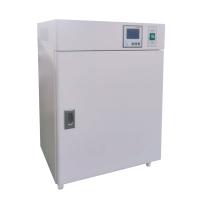
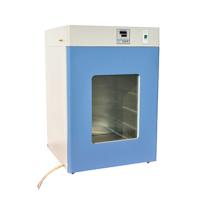
The water-proof constant temperature Incubator is the necessary equipment in the laboratory of industrial and agricultural production, scientific research, university, instrument, medical and health, etc. It is used for bacterial culture , breeding, fermentation and other constant temperature tests with a temperature not higher than 60 ℃ .
Structure introduction
1. The outer shell of this product is stamped with high-quality cold-rolled steel plate, the surface is sprayed with plastic, and the inner tank is SUS304 stainless steel, which is double-sealed. There is a miniature fan in the box, the breeze circulates, and the temperature in the box is uniform.
2. The temperature control device adopts adaptive temperature control liquid crystal display, no need to adjust temperature control parameters, high temperature control accuracy, no overshoot, with timing function, over-temperature protection function, timing time 9999 minutes.
3. The electrical control part is on the top, which is convenient for use and maintenance.
technical indicators
model | GHP-9050 | GHP-9080 | GHP-9160 | GHP-9270 |
voltage | 220V 50Hz | |||
Temperature control range | RT+5~65℃ | |||
Temperature Resolution/Volatility | 0.1°C ±0.5°C | |||
input power | 450W | 650W | 850W | 1350W |
Liner size | 345*350*410 | 400*400*500 | 500*500*650 | 600*600*750 |
Carrier (standard) | 2 blocks | |||
working conditions
1. Ambient temperature +5~40℃.
2. Relative humidity ≤85%RH.
3. Atmospheric pressure 86 ~ 106Kpa.
4. There is no strong vibration around, and the surrounding gap is greater than 50cm.
5. There should be no direct sunlight and heat source radiation for the Test Chamber.
6. There is no strong airflow blowing directly to the box.
7. There is no high concentration of dust and corrosive substances around.
working principle
Turn on the power switch, power on the meter, and set the required temperature and time
The instrument automatically controls the heating, the heating element is a heating tube, water jacket heating, the control element is a two-way silicon controlled element, and the instrument control principle is adaptive control.
Installation and commissioning
1. Install
The water-proof electric heating Incubator should be placed in a room with good ventilation and no strong vibration. Inflammable and explosive items should not be placed around it. The temperature of the installation room is 5°C-40°C, the relative humidity is ≤85%, and it is non-corrosive. gas.
2. Debugging
1. Close the inner and outer glass doors of the Incubator.
2. Plug in the power plug and turn on the power switch. At this time, the low water level indicator light will give an alarm. Use a hose with an inner diameter of 4 minutes to connect one end to the water inlet and the other end to the water source (faucet). Add water until the low water level alarm light is off, and continue to add water (note: add water slowly) until the high water level alarm or the high water level alarm light is on. (Note: The high water level alarm will automatically stop after 5 seconds, and the alarm indicator light will not go out. It will not affect the heating).
3. Set the temperature.
4. Observe whether the temperature rises. If the temperature rises and keeps constant, it means that the equipment is operating normally.
5. Turn off the power.
6. Instrument panel indication (indicator light definition)
⑴ "RUN/AT" indicator light: this light is on during operation, and goes off when the operation is over; this light flickers during self-tuning.
⑵ "OUT" indicator light: the light is on when there is heating output, otherwise it is off.
⑶ "ALM" indicator light: This light will be on when the over-temperature alarm occurs, otherwise it will be off.
⑷ If the low water level light flashes, it means that there is no water in the tank, and it will only flash if there is no alarm.
⑸ When water is added to the tank to a low water level, the light does not flash, and the alarm light does not light. Drain the water from the water outlet until there is an alarm sound and continue to add water, continue to add water until there is no alarm sound, and then turn off the water source before use.
Operation and use of temperature controller
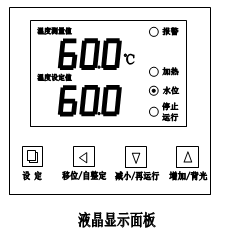
Indicator Definition
1. "OUT" indicator light: the light is on when there is heating output, otherwise it is off.
2. "ALM" indicator light: This light is on when the over-temperature alarm occurs, otherwise it is off.
3. "WL" indicator light: When the water level is too low, the light will be on and the buzzer will sound.
4. "WH" indicator light: This light is on when the water is full.
Operation and usage
1. When the controller is powered on, the upper row of the display window will display "graduation number (P, C, K, S)", and the lower row will display "range value" for about 3 seconds before entering the normal display state.
2. Reference and setting of temperature and constant temperature time
Click the "Setting" button to enter the temperature setting state, the prompt "SP" will be displayed on the lower row of the display window, and the temperature setting value will be displayed on the upper row (the first digit flashes). Modify to the desired set value; then click the "Setting" button to enter the constant temperature time setting state, the lower row of the display window will display the prompt "St", and the upper row will display the constant temperature time set value (the first digit flashes ), you can modify it to the desired setting value by pressing the Shift, Increase, and Decrease keys; then click the "Set" button to exit this setting state, and the modified setting value will be automatically saved.
ET=0时,无定时功能,设定时间不显示。当恒温时间设为“0”时,表示没有定时功能,控制器连续运行,显示窗下排显示温度设定值;当ET=1时,显示窗口下排显示运行时间,并且点亮的小数点闪烁,仪表上电,定时器就开始计时。当ET= 2时,显示窗口下排显示运行时间,并且点亮的小数点闪烁,等测量温度达到设定温度后,定时器开始计时。
若En=0时,时间到,运行结束,显示窗口下排显示“End”,蜂鸣器鸣叫30秒钟,关所有输出;
若En=1时,时间结束,显示窗口显示运行时间 ,蜂鸣器鸣叫30秒钟,温度继续恒温;
运行结束后,长按“移位/再运行”键3秒可重新启动定时器运行。
3.超温报警时,蜂鸣器连续鸣叫,“ALM”报警灯点亮。若由于改变温度设定值而产生超温报警,“ALM”报警灯点亮,但蜂鸣器不鸣叫。
4.水位报警
①高水位报警
系统正常运行时,第一次出现高水位报警时,报警指示长亮,蜂鸣器鸣叫5S。第二次出现高水位报警时,蜂鸣器不鸣叫,但报警指示灯长亮;但是每出现一次低水位报警之后再出现一次高水位报警时,此时蜂鸣器鸣叫5S,报警指示灯长亮。
②低水位报警
系统正常运行时,出现低水位报警时,蜂鸣器连续鸣叫,报警指示灯闪烁显示。
5.蜂鸣器鸣叫时可按任意键消音。
6.“移位/自整定”键:在非设定状态长按此键6秒可进入或退出系统自整定;在设定状态点击此键可使设定值移位闪烁修改。
7.“减小/再运行”键:在非设定状态,当运行结束后,长按此键3秒可重新启动运行;在设定状态点击此键可使设定值递减,长按此键可使设定值连续递键。
8.“增加/背光”键:在非设定状态点击此键可使液晶屏背光点亮或熄灭(此功能只有液晶系列拥有);在设定状态点击此键可使设定值递加,长按此键可使设定值连续递加。
9.在设定状态下若1分钟之内无任何键按下,控制器会自动返回到正常显示状态。
10.若控制器显示窗上排显示“----”,表示温度传感器或控制器本身故障,请仔细检查温度传感器及其接线。
系统自整定
当温度控制效果不称心时可进行系统自整定。自整定过程中温度会有较大过冲,用户在进行系统自整定前请充分考虑此因素。
在非设定状态下长按“移位/自整定”键6秒后进入到系统自整定程序,“RUN/AT”指示灯闪烁,自整定结束后该指示灯停止闪烁,控制器会得到一组更佳的系统PID参数,参数值自动保存。在系统自整定过程中长按“移位/自整定”键6秒后可中止自整定程序。
在系统自整定过程中若有超温报警,“ALM”报警灯不亮,蜂鸣器也不鸣叫,但加热报警继电器会自动断开。在系统自整定过程中“设定”键无效。在系统自整定过程中无论是否有恒温时间设定,控制器显示窗下排总是显示温度设定值。
温度内部参数的参看与设定
长按设定键约3秒,控制器显示窗下排显示密码提示符“Lc”,上排显示密码值,通过增加、减少和移位键,修改到所需的密码值。再点击设定键,若密码值不正确,控制器自动返回到正常显示状态,若密码值正确,则进入到温度内部参数设定状态,再点击设定键可以依次修改各个参数。再长按设定键3秒,可以退出此状态,参数值自动保存。
内部参数表 -1
参数指示 | 参数名称 | 参数功能说明 | (范 围)出厂值 |
Lc- | 密码 | “Lc=3”时可查看并修改参数值。 | 0 |
AL- | 超温 偏差报警 | 当“温度测量值>温度设定值+AL”时,报警灯亮,蜂鸣器鸣叫(参见五.3),断开加热输出。 | (0~20℃) 5 |
P- | 比例带 | 时间比例作用调节。 | (8.0~50.0) 12.0 |
dt | 系统时间 | (180~600) 380 | |
Pb- | 零位调整 | 修正传感器(低温)测量时产生的误差。 Pb=实际温度值-仪表测量值 | (-9.9~9.9) 0 |
PK- | 满度调整 | 修正传感器(高温)测量时产生的误差。 PK=1000*(实际温度值-仪表测量值)/仪表测量值 | (-999~999) 0 |
Et- | 定时功能 | ET=0时,无定时功能;为1时上电就开始定时,为2时到设定值开始定时 | (0~2) 2 |
内部参数表 -2
参数指示 | 参数名称 | 参数功能说明 | (范 围)出厂值 |
Lc- | 密码 | “Lc=9”时可查看并修改参数值。 | 0 |
Hn- | 恒温计时方式 | 0:分钟计时;1:小时计时 | (0~1) 0 |
En- | 运行结束恒温 | En=0运行结束关输出; En=1 to continue constant temperature at the end of the operation; | (0~1) 0 |
oP- | Gating function | 0: Close the door opening judgment function; 1: Enable the door opening judgment function. | (0~1) 1 |
rH- | range value | Set according to the temperature measurement range. | (0~100.0) 65.0 |
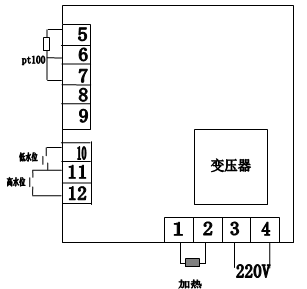
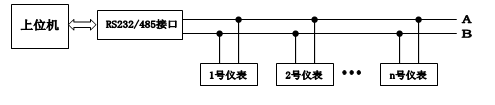
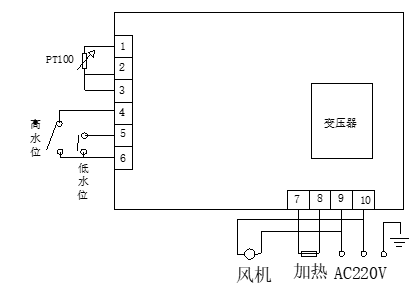
Wiring diagram (LCD series communication as standard, digital series communication as optional)
Communication connection (32 controllers of this series can be connected at the same time)
Safety Precautions
1. The cabinet must be effectively grounded to ensure safety.
2. Box items cannot be placed too densely
3. Do not wipe the distribution line with a wet cloth
4. This type of non-explosion-proof product, flammable and explosive items cannot be put into the box for high-temperature baking test.
5. If the fuse is damaged due to a fault, a fuse of the same specification should be replaced when repairing.
maintenance and maintenance
1. The Incubator should always be kept clean, and the door glass should be wiped with a soft cotton cloth. Do not wipe with a reactive chemical solution to avoid chemical reactions and scratches on the glass.
2. If the Incubator is not used for a long time, it should be covered with a plastic protective bag and placed in a dry room to avoid the use of the damp surface of the electrical parts.
Electrical Schematic
Troubleshooting
Phenomenon | reason | deal with |
1. No power | 1. The plug is not plugged in or disconnected 2. Open fuse | 1. Insert the plug or connect the wires. 2. Replace the controller with the same specification. |
2. The temperature in the box does not rise | 1. Set the temperature low 2. The electric heating tube is broken 3. The meter is broken | 1. Reset 2. Connect the heating film 3. Change the meter |
3. There is a large error between the set temperature and the temperature in the box | 1. The meter is broken. 2. Meter parameters are disordered | 1. Change the meter 2. Readjust the instrument parameters |
Note: 1. Before replacing the melt-out, the cause of the melt-out damage must be eliminated before proceeding. 2. It is necessary to completely cut off the power supply when replacing. | ||