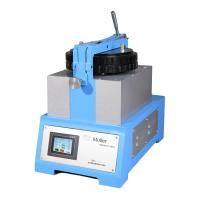
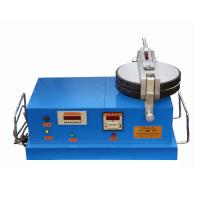
Uses and Features
This machine is a replacement product improved on the basis of the original PM240-2. It is widely used as a physical testing instrument in the industries of pigments, paints, inks, etc. Compared with PM240-2, it realizes the integration of machine control The structure of the machine is more compact, the appearance is more concise, the number of revolutions and loads can be easily changed, and the glass is easy to assemble and disassemble. At the same time, it is equipped with digital display, automatic stop and beeping devices, which make the operation more convenient and the display more intuitive.
Switch function description
Power key: It is used to switch the main power supply, and it is on when the indicator light is on. Reset key: used to clear the number of working times. Click to clear the accumulated number of jobs.
Stop key: used for stopping the work, used for stopping and clearing the running times.
Start: It has a pause function, which is used when starting the machine, stopping halfway and needing to keep the count. Setting key: used to set the number, press the setting key continuously, the order is: hundreds digit-tens digit-ones digit-OK, when the corresponding position is pressed, the changed digit will flash, at this time, you can press the adjustment key Adjust the number of settings for this bit.
Adjustment key: It is used to adjust the number of the position selected by the setting key, press the key continuously, and it will change from 0 to 9 in turn.
Stop counting key: It is used to run the equipment without counting, press once to stop counting, press once to count.
indicator light
When it is on: it means that the machine is in working state, and it cannot be set at this time. When it is stopped, it means that the machine is in the state of stopping. When the setting is on: it means that the machine is in the setting state, and it cannot be turned on at this time.
Install
The power supply of the equipment is two-phase 220V, 50Hz. It should be equipped with a switch and a 3A fuse, and then connected to the terminal on the back of the equipment. Note that the equipment shell must be reliably pressed to the ground before use to avoid danger.
Inspection before use
Before each use of the equipment, check whether the metal sleeve nut of the glass plate is loose, and if it is loose, it should be tightened before use.
Steps
1. Turn on the power: press the power button, the indicator light in the button is on.
2. Put the quantitative reagent and blending agent on the lower glass plate "1", mix it with a spatula to form a slurry, then move the mixed slurry to the center of the grinding disc, put down the upper glass plate, and make the pin "3" and the lock Buckle up the subseat "5", then buckle up the load handle "7", pull down the load handle "7" backward, and hang up the weight of the required mass.
3. Setting of running times: press the setting button to the corresponding position, press the adjustment button to set the number of revolutions, after adjustment, if the number of revolutions is set and does not need to be changed, this operation is not necessary, and then press the start button, the device will start Start running, if you need to pause in the middle and need to keep the number of counts, you can press the start button to pause, so that when you start again, the original count will be accumulated. If you press the stop button to stop, it will start from zero when starting Counting, when the equipment runs to the set number of revolutions and automatically stops, the number of working times is automatically increased by one, and at the same time there is a prompt sound to remind.
pay attention
1. The equipment shell needs to be reliably grounded to avoid danger;
2. When the flat Grinder is running, please do not modify the set number;
3. When running without load, it is necessary to open the grinding disc to avoid damage to the glass;
4. After the work is finished, clean the upper and lower glass, place high-quality paper or other soft objects in the middle, put down the upper grinding disc and close it, so as not to damage the glass;
5. The equipment should be placed horizontally and kept stable.
Failure Analysis
1. If the counter reaches the set number and cannot be stopped, check whether the contacts of the contactor are working normally.
2. If the counter does not count or the technology is abnormal, check the stop switch and signal line.
3. After grinding, when the load handle is pulled up but the grinding disc cannot be opened, check whether the upper and lower grinding disc cover nuts are loose, and whether the shaft head nut is loose.