This article is an introduction to the control system functions of a salt spray testing machine, including a detailed introduction to the display of various parameters on the display.
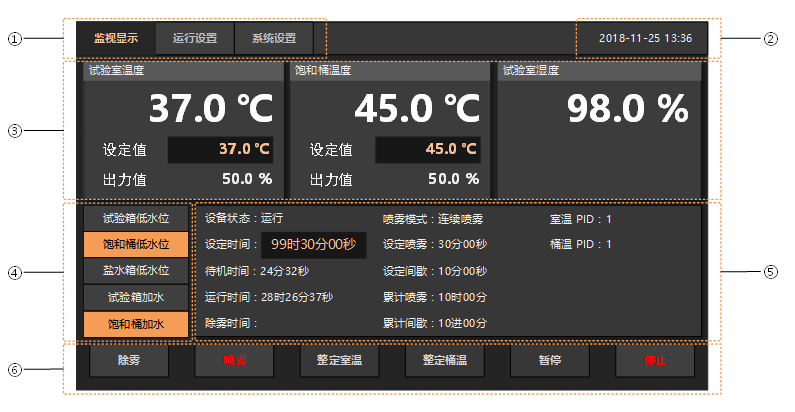
| serial number | illustrate |
| ① | Bookmark page. Selection will switch to the corresponding interface. |
| ② | Display system time. |
| ③ | Display monitoring information: |
| ● Test room temperature: display measured value, set value, and control output value. Click the black edit box to set the control target temperature. | |
| ● Saturation barrel temperature: display measured value, set value, and control output value. Click the black edit box to set the control target temperature. | |
| ● Lab Humidity: Display relative humidity measurement value, and wet bulb humidity. (Only displayed when the temperature function is enabled.) | |
| ④ | Display water level information and working status of water adding components. |
| ⑤ | Display running information: |
| Device status: running/standby/paused/stopped. | |
| Set time: test set time. Click the black edit box to set the test time. | |
| Standby time: the accumulated time of standby. | |
| Run Time: The test run time. If standby, test runs continue to accumulate. | |
| Defog time: display the accumulated time of defog. | |
| Spray Pattern: Displays the spray pattern. See "Run Setup". | |
| Spray time: Display the set spray time. See "Run Setup". | |
| Interval time: display the set interval time. See "Run Setup". | |
| Cumulative spraying: display the cumulative spraying time. | |
| Accumulated interval: display the accumulative interval time. | |
| Room temperature PID: Displays the PID number used for temperature control in the laboratory. | |
| Barrel Temperature PID: Displays the PID number used for saturation barrel temperature control. | |
| ⑥ | Action button: |
| ● Defog: Defog switch. Press this button to start defogging. If the set defogging time>0, the defogging will be automatically turned off after the set time; if the set defogging time is 0, the defogging will not be turned off regularly. | |
| ● Spray: Spray switch, press this button to allow spraying. Spray needs to meet the following conditions to actually perform output: | |
| 1) The spray switch is turned on. | |
| 2) In the running state (if standby is enabled, it will not output in the standby state, and it will be possible to output after waiting for the end of standby). | |
| 3) The spray mode is continuous. | |
| 4) When the spray mode is periodic, it is in the spray period (the output will not be output during the intermittent period). | |
| Note: Only one switch of "Defog" and "Mist" can be turned on at the same time. For example, if the switch of "Defog" is turned on, the switch of "Spray" will be automatically turned off. "switch. | |
| ● Set room temperature: It will only appear in the running state and the "Setting button" is selected as "Display". Clicking this button will start the auto-tuning function of the laboratory temperature control. | |
| ● Tuning barrel temperature: it will only appear in the running state and "Display" is selected for the "Setting button". Clicking this button will start the auto-tuning function for the saturation barrel temperature control. | |
| ● Pause/Unpause: Appears only in the running state, used to pause/continue the ongoing test. | |
| ● Stop/Run: Used to start and stop the test. |
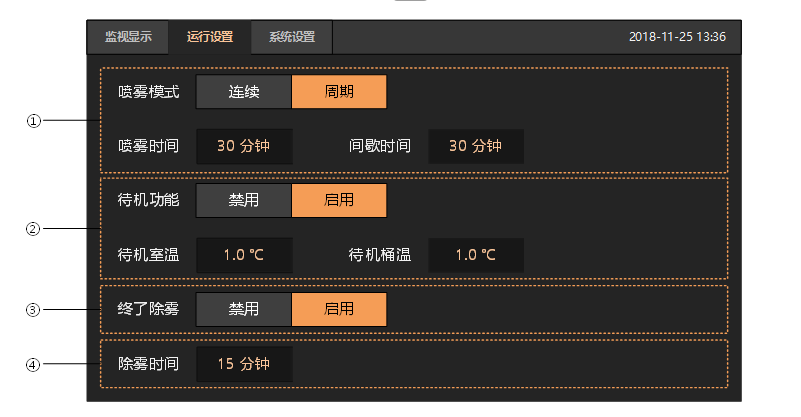
| serial number | illustrate |
| ① | Spray pattern: |
| Continuous: In the test state, if the spray switch is turned on, the spray will be output continuously. | |
| Period: In the test state, if the spray switch is turned on, the spray will be output periodically. | |
| Spray time: In periodic mode, set the spray output period. | |
| Intermittent time: In periodic mode, set the intermittent period of spraying. | |
| Spray needs to meet the following conditions to actually perform output: | |
| 1) The spray switch is turned on. | |
| 2) In the running state (if standby is enabled, it will not output in the standby state, and it will be possible to output after waiting for the end of standby). | |
| 3) The spray mode is continuous. | |
| 4) When the spray mode is periodic, it is in the spray period (the output will not be output during the intermittent period). | |
| ② | Standby function: disable/enable. |
| If the standby function is enabled and the spray switch is turned on, the spray will not perform output until the standby is over. | |
| Standby room temperature: | |
| Assuming that the standby function is enabled, the room temperature measurement value is RPV, the room temperature setting value is RSP, and the standby room temperature setting value is RWV, | |
| Then RPV<RSP-RWV, then perform standby. If RWV is 0, standby is not performed at room temperature. | |
| Standby bucket temperature: | |
| Assuming that the standby function is enabled, the measured value of the room temperature is TPV, the set value of the room temperature is TSP, and the set value of the standby room temperature is TWV. | |
| Then TPV<TSP-TWV, then execute standby. If TWV is 0, the barrel temperature does not perform standby. | |
| ③ | Final defogging: If terminal defogging is enabled, after the test ends automatically, defogging will be performed, and the defogging will maintain the value set by the defogging time. |
| ④ | Defog time: Set the maintenance time after the defogging is started, when the time is up, the defogging will be automatically turned off. If the defogging time is set to 0, the defogging will not be turned off automatically. |
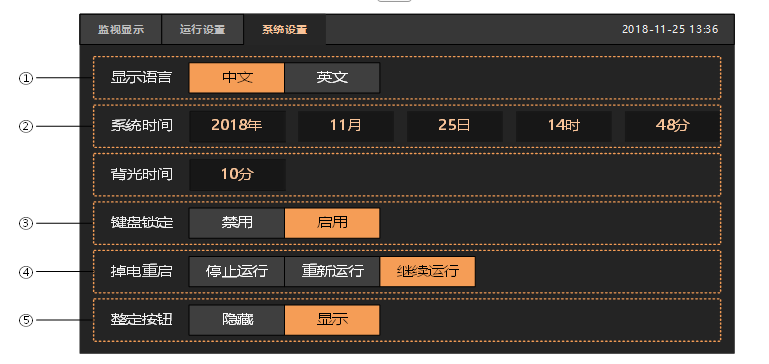
| serial number | illustrate |
| ① | Display language: Chinese or English can be selected. |
| ② | Set the system time. |
| ③ | Set the backlight time. If there is no operation on the screen, the screen will enter the protection mode after the specified backlight time. |
| ④ | Keypad locked. If enabled, only switching screens is allowed, setting parameters and operating the device (such as run/stop, etc.) is not allowed. |
| ⑤ | Set button. If you choose to display, in the running state, a setting button will appear below the “Monitoring Display” interface. |
