Before using the salt spray Test Chamber, it is necessary to set the internal system parameters, including sensor input settings, DO settings, fault settings, PID settings, trial settings and other function settings, which are described in detail below The specific setting method of the salt spray Test Chamber .
Enter the internal system setting method
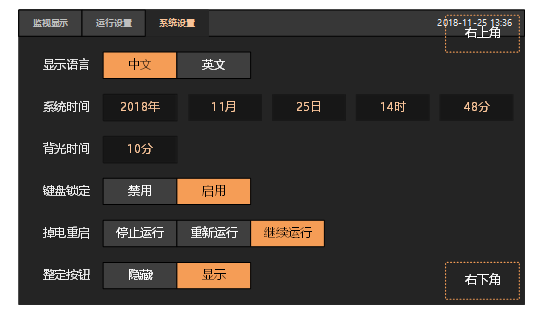
1) Switch to the "System Settings" tab.
2) Tap the lower right corner of the screen first, then tap the upper right corner of the screen.
3) If the system password is set, you need to enter the correct password. If you do not set a password, you will directly enter the general directory.
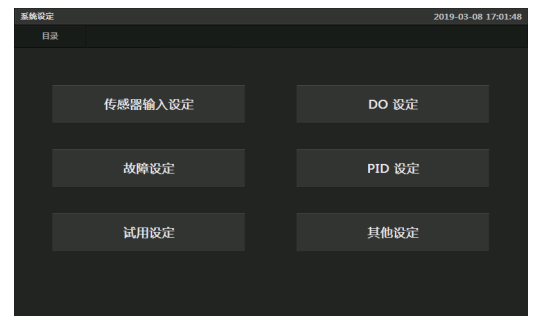
1. General catalog
| serial number | illustrate |
| Sensor input setting | Set the range of the input sensor, filter times, offset compensation, etc. |
| DO setting | Set the signal's start delay, stop delay, associated relay, etc. |
| fault setting | Set the name of the fault, the action to be executed, the source of the fault, etc. |
| PID setting | Set the grouping of PIDs and the control parameters of each group of PIDs. |
| Set the start-up delay, filter time, polarity, etc. of the output SSR. | |
| trial settings | Set up a trial license. It is used to ensure that the payment for equipment can be recovered in time. |
| other settings | Set the scope of the alarm signal, and enter the password set by the internal system. |
1.1 Sensor input setting
| serial number | illustrate |
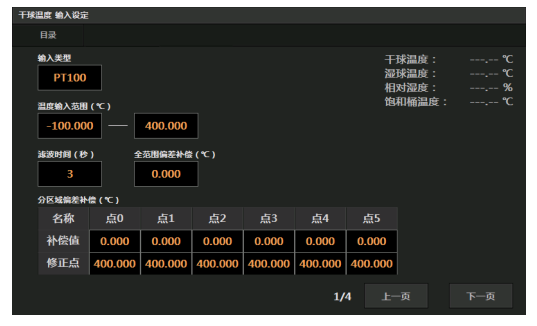
| input type | Please keep the default setting of PT100 . |
| Temperature input range | Only when the temperature of PT100 is within this range, the temperature will be displayed, otherwise ---.-- will be displayed. |
| filter time | The time to filter the input temperature. |
| Full Range Offset Compensation | Performs a full range of offset compensation values for the entered temperature. |
| Regional deviation compensation | If different temperature points have different deviations, use sub-area deviation compensation. The correction point specifies the temperature point to be compensated, and the compensation value specifies the value to be compensated at the temperature point. |
Note: Bias compensation (full range and sub-region) may need to be adjusted slightly during 3rd party calibration.
1.2 DO setting
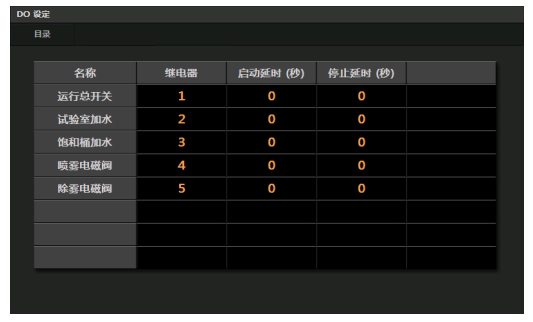
Relay: The relay number associated with the signal, when the signal output is ON, the relay output is also ON. When the signal output is OFF, the relay output is also OFF.
Start delay: If the condition of signal output ON has been met, it needs to delay the specified time before outputting ON.
Stop delay: If the condition of signal output OFF is met, it needs to delay the specified time before outputting OFF.
| signal name | logical explanation |
| run main switch | When the operation starts, the ON condition is satisfied. When the operation is stopped, the OFF condition is satisfied. |
| Add water to the laboratory | When the water level in the Test Chamber is low, the ON condition is satisfied. The OFF condition is satisfied when the water level in the Test Chamber is not low. |
| Add water to saturated bucket | When the saturation bucket water level is low, the ON condition is met. When the water level in the saturation bucket is not low, the OFF condition is met. |
| Spray solenoid valve | The ON condition is met when spraying is started. When spraying is stopped, the OFF condition is satisfied. |
| Demist solenoid valve | When defogging is started, the ON condition is met. When defogging is stopped, the OFF condition is met. |
Note: If the default standard wiring diagram is used for wiring, the above settings can be kept unchanged.
1.3 Fault setting
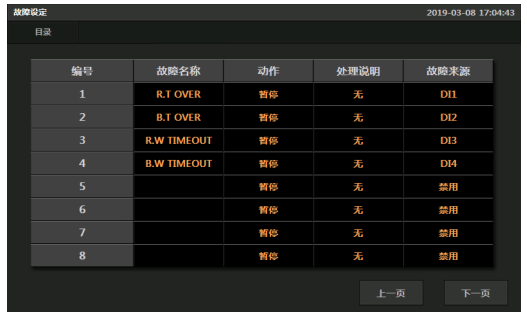
Name: Set the name of the fault display.
Actions: Notify/Pause/Stop. If a failure occurs, the set action is performed.
Disposition Note: Reserved, not used in current version.
Fault source: DI1~DI4. DI0 means disable the fault.
| source of failure | illustrate |
| DI 1 | When the temperature of the Test Chamber exceeds the set value, an alarm is issued. |
| DI2 | When the temperature of the saturated barrel exceeds the set value, an alarm is issued. |
| D I3 | When the water filling time in the Test Chamber exceeds the set value, an alarm will be issued. |
| D I4 | When the time of adding water to the saturated tank exceeds the set value, an alarm will be issued. |
Note: If the default standard wiring diagram is used for wiring, the above settings can be kept unchanged.
1.4 PID setting
Generally no modification is required.
1.5 Trial Settings
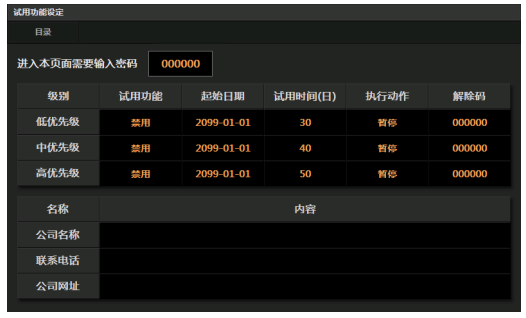
If it is enabled, it will be counted from the initial period. If the trial time is exceeded, a keyboard will pop up to ask for the release code, and the set action will be executed. If the correct release code is entered, the trial function at that level is disabled.
Example:
Low-priority activation, start date: January 1, 2019, trial period is 15 days, execution action is pause, release code is 1234. On January 16, 2019, the controller will pop up a keyboard to ask for the release code, and if the device is running, the execution will be paused. Only when the user obtains and inputs the correct release code can the low-priority trial function be disabled, otherwise the low-priority trial function will be executed again even if the power is turned off and restarted.
Note: Medium priority release codes can release low-level and medium-level trials, and high-priority release codes can. Unlock low-level, medium-level, and high-priority trials. If you need to unlock all trial functions at once, please provide users with high-priority unlock codes.
1.6 Other settings
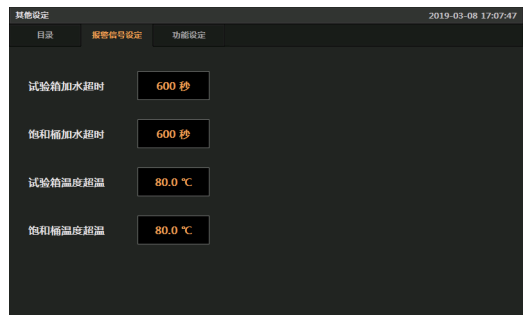
| name | logical explanation |
| Test box water overtime | When the test box starts to add water, it will start timing, and if it has not stopped after the specified time, it will alarm. |
| Saturation tank water filling timeout | When the saturation bucket starts to add water, it will start timing, and if it has not stopped after the specified time, it will alarm. |
| The temperature of the Test Chamber is overheated | When the temperature of the Test Chamber exceeds the set temperature, an alarm will be issued. |
| Saturation bucket temperature overheating | When the temperature of the saturated barrel exceeds the set temperature, an alarm will be issued. |
