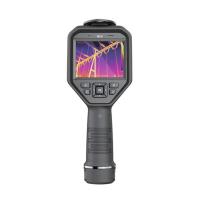
Thermal imaging cameras are handheld imaging cameras used for predictive maintenance, equipment troubleshooting and verification. Thermal images are displayed on the LCD and can be saved to internal memory.
Built-in storage to take pictures
The built-in memory of this thermal imager can save 20 thermal images. Saved pictures can be transferred to a smartphone or tablet via Bluetooth .
1. Aim the thermal imager at the object to be measured.
2. Short press the trigger button to acquire the image, at this time the image will be frozen.
3. If you don't want to save the currently captured picture, short press the trigger button again, the picture will unfreeze and return to normal mode.
4. If you want to save the currently acquired picture, press the "Save" soft key to confirm saving.
5. If the image is saved successfully, the current image will be automatically unfrozen and enter the normal measurement mode.

image browsing
In the setting menu->memory->picture browsing menu, you can browse the photos you took.
1. The file name of the currently browsed picture. .
2. The serial number of the current picture/the number of pictures that the chief engineer can take, and the built-in storage of this thermal imager can take up to 20 pictures.
3. The temperature of the center point of the current heat map. .
4. Heat map image display area.
How to delete/share photos
In picture browsing mode, press the trigger button, the delete/share sub-function menu will pop up, press the "del" button to delete the current photo, press "share" to share the current photo to the smartphone device.