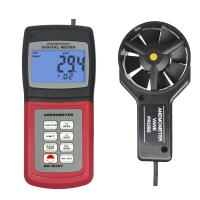
按键功能
IRT:长按以测量远距离表面温度,释放按键,温度值保持在屏幕上。
MAX/MIN (空气温度测量):用于记录和存储温度测量的最大值和最小值读数。
AVG:用于在FLOW或VELOCITY模式下获取多点测量的平均值。
HOLD曾(空气温度测量):按此键可锁定当前显示的温度读数。再次按压解除锁定。
长按此键约2秒可激活LCD背光灯。再次长按此键约2秒关闭背光灯。
开机关机按键:按压以打开或关闭仪表。
MAX/MIN<(风速/风量测量): 用来记录和存储单点测量时的最大值、最小值和连续移动平均值读数。在AREA模式下,按压此键可改变小数点位数。
CF单位选择1向上方向键▲:按此键选择操作模式或测量单位。FLOW模式下,仪表显示风量; VELOCITY 模式下,仪表显示风速。AREA模式下,此键为向上(▲)方向键。
AREA/NEXT:按此键进入面积设置模式。NEXT向下方向键,在AREA模式下,用于选择8个不同的面积值。在最大值/最小值/平均值模式下,按此键可消除己存储:的读数值。
HOLD(风速/风量): 按此键锁定当前风量或风速读数值。再次按压此键可解除锁定。AREA模式下,此键为向右万向键。
风速测量

1.将传感器连接至仪表顶端的传感器插孔;
2.按开关键山启动仪表;
3.使用UNITS按键选择风速功能,重复按压此键,直至LCD屏幕上出现“VEL”;
4.长按UNITS按键约2秒,直至听到“嘟嘟”两声,更改温度单位,选择°C或°F;
5.使用UNITS按键选择风速单位:
6.将传感器置于测量点,确保风向与箭头(风扇内表面) 所指方向一致(见右图)。
7. Read wind speed and wind temperature readings on the LCD screen.

Air volume measurement
1. Connect the sensor to the sensor jack on the top of the meter;
2. Press the key to start the meter;
3. Use the UNITS key to select FLOW mode, press this key repeatedly until FLOW CFM (cubic feet per minute) or FLOWCMM (cubic meters per minute) appears on the LCD screen ;
4. Measure the area of the tuyere, calculated in square feet or square meters;
Note: If the dimensions are measured in inches (or centimeters), convert them to feet (or meters) before calculating the area;
5. To start the area mode, press and hold the AREA button for about 2 seconds until you hear two beeps;
6. Press the NEXT button continuously to select the storage location to store the area value (8 storage locations in total);
7. Use the ▲ key to adjust the value of the flashing number, the ▶ key to adjust the editing digit, and the ◀ key to move the decimal point;
8. Press and hold the AREA button for about 2 seconds until you hear two beeps to save the area value:
9. Place the sensor at the measurement point to ensure that the wind direction is consistent with the direction indicated by the arrow (inner surface of the fan);
10. Read air volume and air temperature readings on the LCD screen:
11. If the CFM or CEM reading value is greater than 9999, X10 or X100 will be displayed in the lower right corner of the LCD screen, indicating that the current displayed value needs X10 or X100 to obtain the correct air flow measurement value.
Non-contact infrared surface temperature measurement

The built-in infrared sensor can measure the surface temperature of any object from a long distance, and the laser pointer can help users aim at the target precisely.
1. Press the switch key to start the meter:
2. The infrared sensor is located on the top of the meter:
3. Point the sensor to the surface of the object;
4. Long press the IRT button to measure the surface temperature of the target object. IR TEMP and gold on screen, laser pointer
5. Start to aim at the target precisely; 5. The measured infrared surface temperature will be displayed on the LCD screen. The measured temperature is the temperature in the target area::
6. After releasing the IRT button, the laser pointer is turned off, and the screen keeps the measured value for about 7 seconds:
After 7.7 seconds, the meter returns to the air speed/volume and air temperature modes.