
Richter Hardness Tester DHT-200 DGC Metal Material Richter Hardness Tester
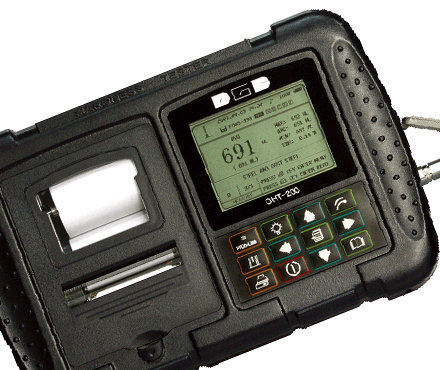
DGC DHT-200 Richter Hardness meter is a Richter Hardness instrument that detects the hardness of materials of various metals. DHT-200 Richter Hardness meter can be converted into HRC, HRB, HV, HS and other commonly used Hardness standards.
 DGC
DGC
-
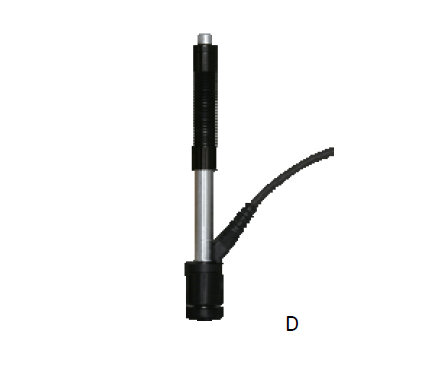
Deguang Electronics D-type Leeb Hardness Tester probe Leeb Hardness Tester standard impact device
$ 687.00 -
LINSHANG LS253DL type, metal Leeb Hardness Tester with DL probe
$ 561.00 -
Handheld Leeb Hardness Tester KAIRDA NDT280 Metal shell Durable Hardness Gauge
Login -
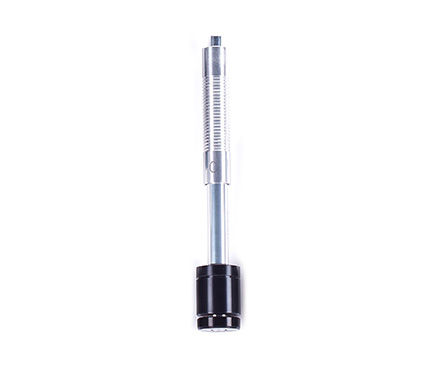
LEEB Type C Hardness Gauge Impact unit for steel and cast/alloy tool steels
Login -
Leeb Hardness Tester DHT-400Dplus
$ 1954.00
Introduction
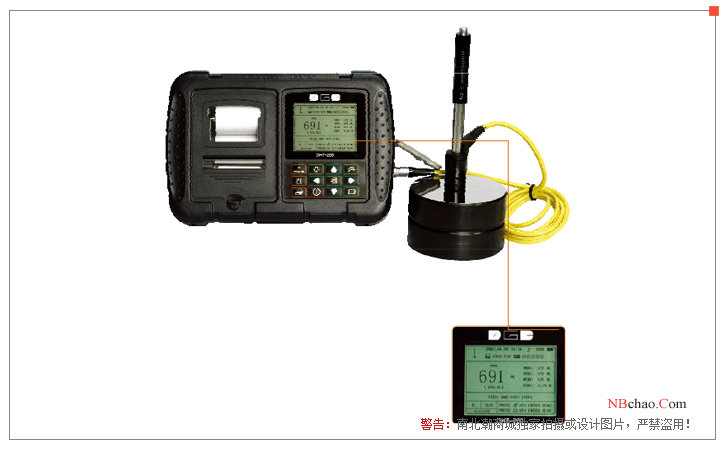
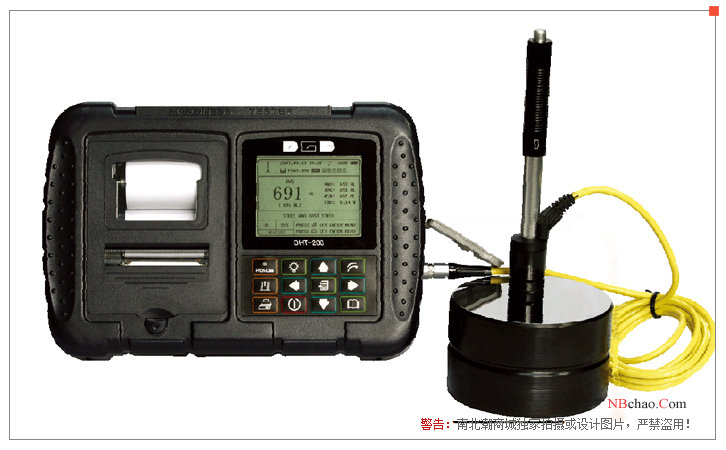
In appearance, Deguang DHT-200 Leeb Hardness Tester is a black shell, with LCD screen, button operation, small size, easy to carry. Functionally,The DHT-200 Leeb Hardness Tester is equipped with a sensitive printer that is capable of printing measurement data in real time. Using the Leeb hardness measurement principle, the hardness of a variety of metal materials can be detected, which is convenient for detection in a variety of Operating Environments, and can freely convert a variety of hardness systems, such as HRC, HRB, HV, HS, etc., and the measurement is stable and reliable.
Principle
The hardness measurement of the DHT-200 Leeb Hardness Tester is defined as:The rebound of the impactorThe velocity is divided by the impact velocity of the impactor and multiplied by 1000. For specific metal materials (e.g. steel, aluminum, etc.), the Leeb hardness value reflects the materialThe hardness relationship of the material, and the Leeb hardness value can be converted into other statically measured hardness values (e.g. HB, HV, HRC, etc.).
Product Structure
The instrument structure of DHT-200 Leeb Hardness Tester is divided into the main unit, display part and keyboard part, which are as follows:
1、DHT-200Leeb Hardness TesterHost section
1) Signage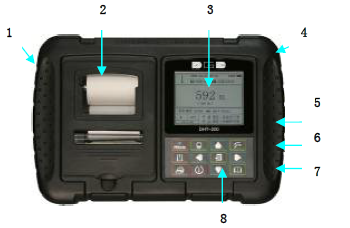
2) Built-in printer
3)LCD
4)Battery compartment/instrument support frame
5)USB port/battery charging port
6)Sensor interface
7)RESET port
8)keyboard
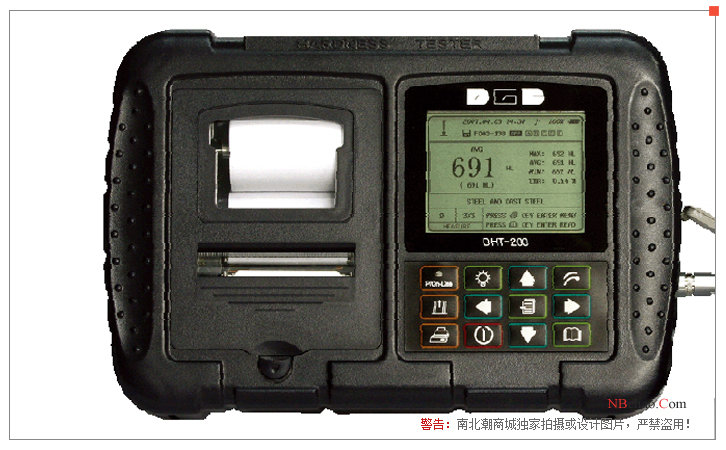
2. Display part
1)Direction of impact;2)automatic storage of indicators;3)Storage files currently in use;4)date and time;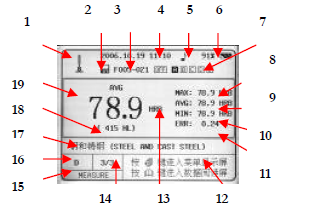
5)Tone indicator;6)battery level;7)Workpiece marker;8)Measurement data maximum;
9)Mean of measurement data;
10)Measure the minimum value of the data;
11)The relative error of the measurement;
12)Operation cue area;
13)Hardness system after conversion;
14)Number of measurements;
15)Measurement status;
16)Sensor type;
17)Measure the material;18)Richter measurements;19)Measure the conversion value.
3. Keyboard part
1)Printer status/charging indicator
When the traffic light is on at the same time, it means that the printer is online and can print;
Only when the green light is on, it means that the printer is offline, and you can choose to install the printing paper or replace the walking paper;
When an external charger is connected, this indicator lights upDHT-200 Leeb Hardness Testeris in a state of charge.
2)Menu item orientation/workpiece marking keys
Menu item arrow keys: In the menu, you can adjust the menu items;
Workpiece Marking Key: The workpiece marking of the stored data can be adjusted when measuring the status.
3)Backlight key: Used to turn the LCD backlight on or off.
4)Menu item Direction/Printer Power On/Current Measurement Print Key
Menu arrow keys: In the menu, you can adjust the menu items;
Printer power on button: When measuring the status, press once to turn on the power of the printer;
Current Measurement Print Button: After the printer is powered on, press it again to print the current measurement data.
5)Menu/Confirm key
Menu key: Enter the menu item;
Confirm key: Confirm the settings in the menu item.
6)Delete the /Esc key
Delete key: In the measurement state, it is used to delete the error value in the measurement;
Esc key: In the menu state, used to exit the menu item.
7)Menu item orientation/workpiece marking keys
Menu item arrow keys: In the menu, you can adjust the menu items;
Workpiece Marking Key: The workpiece marking of the stored data can be adjusted when measuring the status.
8)Reading button: ReadDHT-200 Leeb Hardness Tester.
9)Menu item Direction/Printer Power Key
Menu item arrow keys: In the menu, you can adjust the menu items;
Printer Power Key: When the printer is working, press once to power off the printer.
10) On/off key: Turn on or offDHT-200 Leeb Hardness Testerpower supply.
11)Printer Online/Offline Key: When the printer is working, complete the online or offline state between the printer and the instrument. Print when onlineThe status indicator light and traffic light are on at the same time.
12)Printer Paper Feeding Key: The printer is offline and can complete the paper feeding function.
Measure bow and arrow requirements
The DHT-200 Leeb Hardness Tester has the following requirements for the measurement of workpieces:
1. Surface requirements
a) The surface temperature of the measured workpiece should not be overheated< 120°C;
b) The surface roughness of the tested workpiece is 2 microns, which is equivalent to the original national standard △ 6.
c) For the test of the measured workpiece with a surface diameter of less than 30mm, a small support ring or a corresponding heterosexual support ring should be used.
2. Requirements for the weight to be measured
a) Specimens weighing more than 5kg, which do not require support;
b) Specimens weighing 2-5kg, specimens with overhangs and thin-walled specimens should be supported by objects during testing to avoid impact force causing testsdeformation, distortion and movement of parts;
c) If the weight is less than 2kg, it should be tightly coupled with the support body weighing more than 5kg, and the surface of the specimen and the coupling body should be flat and smooth.The amount of couplant (alum, oil, etc.) should not be too large, and the test direction should be perpendicular to the coupling plane.
Actual picture of the product
DGC DHT-200 Hardness TesterSpecifications
| LIST | VALUE |
|---|---|
| Display | 320 × 240 dot matrix LCD display, LED backlight |
| Measurement range | 180~960HL、17.0~68.0HRC、13.3~100.0HRB、5.0~99.9HS、30~680HB、80~999HV |
| Error of indication | ±0.5%(HL=800) |
| Data storage | The number of custom files provided to users is 200, and a single file can store up to 999 sets of data |
| Power Supply | Four AA rechargeable batteries (No. 5), which can work continuously for not less than 48 hours (without backlight) |
| Automatic shutdown | The shutdown status of the instrument can be customized. |
| Operating temperature | Operating temperature: -20 ℃ - + 40 ℃; Storage temperature: -30 ℃ - + 60 ℃ |
| Dimensions | 215*145*46mm |
| Weight | 600G (including battery) |
| Indication Repeatability | ±0.8% |
| Indication Repeatability | ±0.8% |
DGC DHT-200 Hardness Tester Packing list
Host x1, probe x1, Richter Hardness block x1, charger x1, brush x1, small support ring x1, software and transmission cable x1, random data x1, instrument case x1.
[Note] Because the manufacturer's packaging may be updated or upgraded, the detailed packaging list shall be subject to the latest standard configuration of the manufacturer.
FAQ
- What is the Hardness of Paint Film and How to Measure It?
- Detailed explanation of the method for measuring film Hardness - super detailed
- Film Hardness Pencil inspection method
- Purpose and method of coating hardness testing
- Classification of Sclerometers [Full]
- [Film Properties and Measurements] - Determination of film hardness
- Hardness unit conversion table, Brinell Rockwell Vickers hardness conversion formula
- How to measure film hardness
- DHT-200 Leeb Hardness Tester operation manual
- How is the Film Hardness Measured?