Reader's Guide
This manual is compiled based on manufacturer's data. Due to equipment batch changes, the content may not fully match every physical unit. Please refer to the actual operation and on-device labels.
Copyright belongs to the manufacturer. For internal reference of purchasers only. If safety parameters in the manual differ from the physical unit, please suspend operation and consult our engineer for confirmation.
Disclaimer: This manual is for reference only. In case of any discrepancy, the physical unit shall prevail. Our company assumes no liability for any consequences arising from operations based on this manual.
HUXI HW-400T Microplate Shaker Instruction Manual
Microplate oscillators
User manual
Preface
Thanks to the purchase of micro-hole plate oscillators. This user manual includes instrument functions and operating procedures. To ensure correct use, please read the manual carefully before operating the instrument. Please keep the manual safe so you can read it quickly when you encounter problems.
Unboxing inspection
When users open the instrument box for the first time, please check the instrument and accessories against the packing list. If you find any errors, incomplete parts, or abnormalities, please contact the seller or manufacturer.
Table of Contents
Important Notes -------------------------- 3 1. Important Safety Operation Information -------------------------- 3 2. Safety -------------------------- 3 3. Instrument Maintenance --------------------------4 4. After-sales Service -------------------------- 4 Chapter 1 Introduction -------------------------- 5 Chapter 2 Characteristics -------------------------- 6 1. Normal working conditions-------------------------- 6 2. Basic Parameters and Performance -------------------------- 6 Chapter 3 Basic Operation Instructions --------------------------7 1. Structural Diagram --------------------------7 2. Control panel --------------------------7 Chapter 4 Operation Guide -------------------------- 8 1. Speed and timer setting --------------------------8 2. Operation and stop functions--------------------------8 Chapter 5 Fault Analysis and Handling -------------------------- 9 Note --------------------------10
Important note
1. Important safety operation information
Users need a complete understanding of how the instrument works before safely operating it. Users should carefully read this manual before operating the instrument.

⚠ No one is allowed to operate the instrument before reading the manual. If the instructions are not followed in the manual, the instrument may cause accidental injury during operation and may result in electric shock accidents. Please carefully read the following safety tips and guidelines, and implement all precautions within them.
2. Safety
During all processes of operating, maintaining, and repairing this instrument, the following basic safety precautions must be followed. Failure to comply with these measures or warnings noted elsewhere in this manual may affect the protection provided by the instrument and the expected scope of its use.

This instrument is a Class I Type B standard standard equipment that meets the GB9706.1 standard. This instrument is intended for indoor use.

Please read this operation manual carefully before operating this device; otherwise, it may cause personal injury. Only qualified inspectors trained in how to install and use electrical equipment can operate this instrument.

Operators should not attempt to open or repair the instrument, as doing so will disqualify you from warranty coverage and may also result in electric shock. If repairs are needed, our company will be responsible for the repairs.

Before connecting the power supply, ensure the voltage matches the instrument's required voltage. And ensure that the rated load of the power socket is not less than the instrument's requirements.
If the power cord is damaged, it must be replaced. When replacement, the power cord must be replaced with a power cord of the same type and specification. Do not press anything on the power cord during use. Do not place power cords where people are walking.
Always hold the power cord when plugging or unplugging. When plugging in, make sure the plug is fully inserted into the socket; do not forcibly pull the power cord when unplugging.

This instrument should be placed in a place with low humidity, minimal dust, away from water sources, and away from direct sunlight and strong light. The room should be well-ventilated, free from corrosive gases or strong magnetic field interference, and kept away from heating, stoves, and all other heat sources. Do not place the instrument in damp or dusty areas.

When stopping operation, turn off the power. If the instrument will not be used for a long time, unplug it and cover the instrument with a soft cloth or plastic paper to prevent dust from entering.

In the following situations, immediately unplug the instrument's power cord from the outlet and contact the supplier or have a trained technician handle it:
Liquid spills into the inside of the instrument;
The instrument must be exposed to rain or water;
The instrument is not functioning properly, especially if any unusual sounds or odors appear;
Instrument dropped or casing damaged;
The instrument's functions have changed significantly.
3. Instrument maintenance
This instrument should regularly clean the tray and clamp with a clean soft cloth dampened with a small amount of anhydrous alcohol.
If there are stains on the surface of this instrument, clean it with a soft cloth dipped in cleaning paste.
4. After-sales service
a) Warranty content
Within one month from the date of delivery, our company will be responsible for replacing any faults caused by defects in materials or manufacturing.
This instrument is covered for faults caused by material and manufacturing defects within 12 months from the date of delivery. During the warranty period, our company will selectively repair or replace any instruments proven to be defective.
Products under warranty must be sent by the user to a repair department designated by our company. The shipping cost for sending the instrument from the user to the maintenance department shall be borne by the user. Our company will cover the shipping costs for returning the instrument to the user.
For repairs outside the warranty period, our company will charge an appropriate repair cost.
b) Warranty coverage
The above warranty is not suitable for damage caused by improper use or maintenance by the user, use under non-compliant conditions, unauthorized repairs, or modifications.
Chapter 1 Introduction
The microplate oscillator is a high-speed oscillator specially designed for microplate labeling plates and cell culture plates, combining brushless DC motors with microcomputer technology. The one-touch operation mode makes it very convenient for users to set parameters, making it simple and easy to use. It can load up to 4 microplate-labeled plates (96-well/384-well plates) and cell culture plates (24-well, 48-well, 96-well, etc.) at a time.
This product has the following features:
The LCD displays the system's operating status and parameter values in real time
Uses high-quality switching power supplies, ensuring stable and reliable long-term operation of the entire machine
Uses a one-touch knob for operation, simple and easy to use
The cultivation time can be set arbitrarily within a range of 0~100 hours, and when the timer ends, an automatic prompt sound is emitted
Automatic fault detection and buzzer alarm functions
Chapter 2: Characteristics
1. Normal working conditions
Operating Temperature: 4°C ~ 45°C
Relative humidity: ≤70%
Power supply: AC100-240V 1.5A
2. Basic parameters and performance
| Parameters and performance | |
| Rotational speed | 50~1000rpm |
| Amplitude | 3mm |
| Time setting | 99h59min |
| Input power | 35W |
| Power supply | AC100~240V 50/60Hz |
| Dimensions (mm) | 330×370×140 |
| Sample size | 4 standard boards |
| Weight (kg) | 4.0 |
Chapter 3 Basic Operation Instructions
1. Structural schematic
(This is a schematic diagram of the instrument's structure; please refer to the actual product.)
2. Operation panel
The control panel includes a speed knob, a time knob, an LCD display, and a power switch.
Speed knob: Turn the set speed and press to start and run.
Time knob: Rotate the set time, press to switch the hour/minute setting.
Chapter 4 Operation Guide
1. Speed and timer settings
Parameter settings:
When the instrument is powered on, it is in standby mode; the time zone displays the currently set time, and the speed zone shows the currently set speed.
Setting:
Rotate Speed knob Current speed can be set.
Rotate Time knob You can set the current time; pressing the time knob switches between minutes or hours.
Run:
While waiting, press it Speed knob Can run directly.
In the set state, it will automatically exit the set state and start running for about 3 seconds without setting.
Malfunction:
If the motor experiences a malfunction, the speed zone will be displayed Err Mark.
2. Run and stop functions
Press the speed knob to start running; pressing the knob again during operation will stop the program.
Chapter 5 Fault Analysis and Handling
If the instrument encounters any abnormalities, please refer to the following common questions:
| Fault phenomena | Possible causes and solutions |
|---|---|
| Unable to start | Check whether the power connection is correct and whether the power switch is turned on |
| The rotational speed is abnormal | Check whether the tray clamp is properly clamped and whether the sample is placed evenly |
| Display Err | For motor failure, please contact after-sales service |
If the above methods do not resolve the issue, please contact a professional repair technician.
Note
The contents of this handbook are subject to change without prior notice. Please keep this manual safe for reference.
Proper use and maintenance of the instrument can ensure its long-term stable operation. If you have any questions about the operation, please feel free to contact technical support.
-
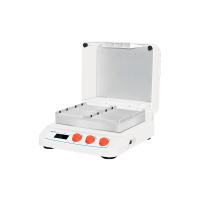 HUXI HW-400T Microplate Shaker$ 500.00
- 1HUXI HT-10/HT-20 Track Shaker Instruction Manual
- 2HUXI HX-10 series mini thermostatic metal bath instruction manual
- 3HUXI HX-20T series thermostatic Mixer instruction manual
- 4HUXI HX-20 series, high temperature thermostatic metal bath instruction manual
- 5HUXI HT-W330 Series, Multifunctional Benchtop Shaker Instruction Manual
- 6HUXI HT-X330 Series Multifunctional Benchtop Shaker Instruction Manual
- 7HUXI HF-1L Inverter Speed Regulation Glass Reaction Kettle Instruction Manual
- 8HUXI MS-D50/100 Vertical Digital Display Large Capacity Magnetic Stirrer Instruction Manual
- 9HUXI HTG Series Roller Mixer Instruction Manual
- 10MUXUAN ZJB-250S Laboratory Stirrer Instruction Manual